

You have a microphone, a guitar, and a head full of ideas. The final barrier between your creativity and a polished recording is often a small, misunderstood box: the audio interface. For new podcasters, musicians, and streamers, choosing your first interface is a critical step. It converts your analog voice or instrument into digital data your computer can understand, and its quality dictates the clarity of everything you produce.
This guide cuts through the technical jargon to review the most reliable entry-level audio interfaces available. We have assessed options that balance essential features, sound quality, and ease of use, ensuring you can start recording with confidence without overspending. Whether you are setting up a simple podcast or laying down your first song demos, the right foundation is here. For those looking ahead, you can explore more advanced options in our guide to the best modern audio interfaces.

Pros
- Exceptional value for money with solid build quality and professional features typically found in higher-priced interfaces
- Intuitive design with independent controls for each input channel allows quick adjustments without software complexity
- Plug-and-play USB-C setup eliminates driver frustration and gets users recording within minutes of unboxing
- Versatile input options support condenser mics, dynamic mics, guitars, keyboards, and line-level devices
- Real-time direct monitoring eliminates latency issues that frustrate performers during vocal and instrument recording
Cons
- Maximum 48kHz sample rate limits professional studio applications requiring higher resolution recording like 96kHz or 192kHz
- 2-channel configuration restricts simultaneous multi-track recording for complex music production workflows
- 3-month warranty period is relatively brief compared to competitors offering extended protection plans
The AMZ-UTHHF USB audio interface represents an excellent entry point for anyone launching a home recording setup. Whether you are a podcaster, musician, content creator, or streamer, this compact device delivers the essential features needed for professional-quality audio capture without overwhelming beginners or straining budgets.
The standout feature is undoubtedly the 48V phantom power combined with dual XLR/TRS combo inputs, enabling use of professional condenser microphones alongside dynamic mics, guitars, and keyboards. Real-world performance proves solid across all input types, with the direct monitoring function providing zero-latency playback that makes recording vocals and instruments genuinely enjoyable. The adjustable echo effect adds creative flexibility for karaoke, livestreaming, and vocal performances.
Build quality feels reassuringly solid for the price point, with a compact footprint that respects desk real estate while offering independent gain controls for each input channel. The USB Type-C connectivity ensures compatibility across modern devices, and setup is genuinely plug-and-play without driver headaches that plague many budget interfaces.
The primary limitations stem from the 48kHz maximum sample rate and 2-channel configuration, which rule out professional studio work requiring higher resolution recording or complex multi-track sessions. The 3-month warranty is also shorter than ideal, though customer feedback suggests reliability is not a concern for typical use cases.
For beginners, hobbyists, and content creators seeking straightforward, dependable audio recording without complexity or excessive cost, this interface delivers remarkable value. It handles podcasts, YouTube videos, Twitch streams, guitar practice, and basic music production admirably, making it a smart choice for launching your creative audio journey.
Audio Inputs: 2x XLR/TRS combo inputs, 1x instrument input
Audio Output: Headphone output with independent monitor volume control
Connectivity: USB Type-C
Phantom Power: 48V switchable for condenser microphones
Sample Rate: Maximum 48kHz
Channels: 2-channel audio recording
Echo Effect: Adjustable echo control for enhanced sound quality
Direct Monitoring: Real-time, low-latency monitoring with independent control
Compatible Operating Systems: Windows PC, macOS, iOS
Dimensions: Compact desktop footprint
Weight: 1.5 pounds
Warranty: 3-month manufacturer warranty
Podcasters: Dual XLR inputs accommodate co-hosts or guest interviews with professional audio quality and direct monitoring for confident delivery.
Musicians and Guitarists: Dedicated instrument input plus phantom-powered condenser mic input enables recording vocals and instruments simultaneously with zero-latency monitoring.
Content Creators: Straightforward controls and USB-C compatibility work seamlessly with streaming software for YouTube, Twitch, and TikTok productions.
Singers and Vocalists: 48V phantom power supports professional condenser mics while echo effect control adds creative enhancement for vocal performances and karaoke.
Beginners and Hobbyists: Simple setup, intuitive controls, and affordable price eliminate barriers to entry for anyone starting their recording journey.
Home Studio Owners: Compact design respects limited desk space while delivering features typically reserved for professional-grade interfaces.
Pros
- Excellent preamp quality produces bright, clear recordings with minimal noise floor
- Air mode adds professional polish to vocal and acoustic recordings without additional equipment
- Compact design perfect for home studios, bedroom producers, and mobile recording setups
- Included software suite eliminates need for expensive DAW purchases
- Highly reliable brand with strong reputation in professional audio industry
Cons
- Single microphone input limits simultaneous multi-instrument recording capabilities
- May require audio driver updates for optimal performance on some Windows systems
- Learning curve for beginners unfamiliar with audio interface operation and gain staging
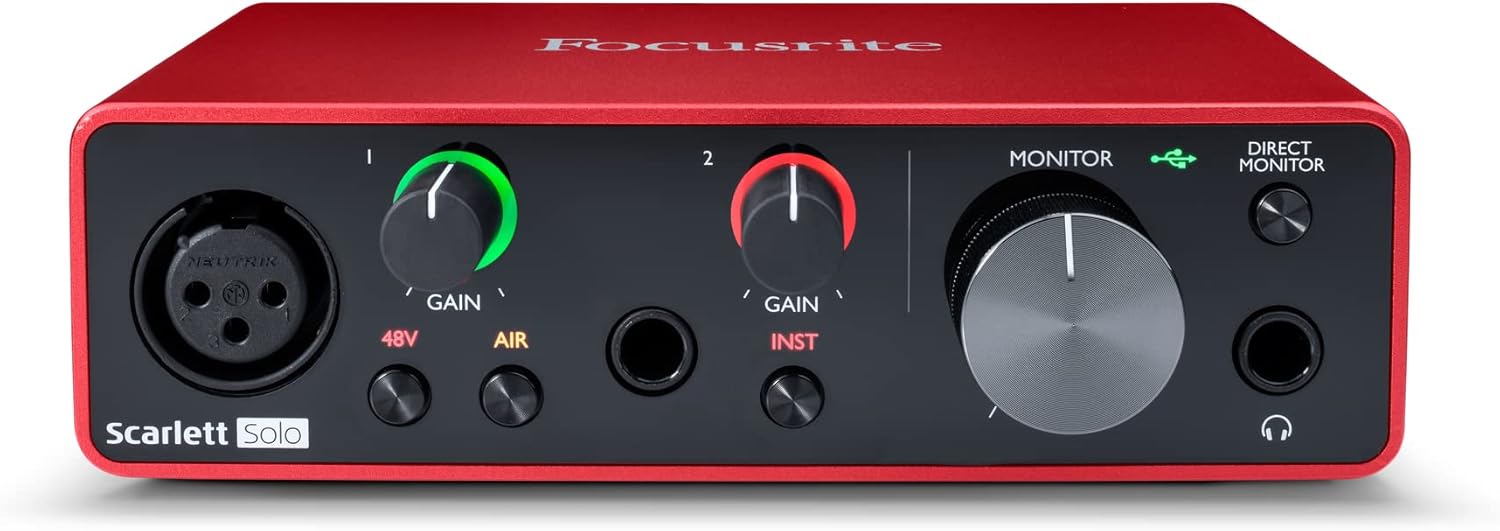
The Focusrite Scarlett Solo 3rd Gen is a professional USB audio interface designed for musicians, podcasters, and content creators who demand studio-quality recordings without the complexity of larger mixing consoles. This compact device bridges the gap between budget-friendly entry-level gear and expensive professional equipment, making it ideal for home studios, bedroom producers, and anyone serious about capturing professional-grade audio.
The standout feature is undoubtedly the high-performance microphone preamp paired with the innovative Air mode, which adds extra clarity and presence to vocals and acoustic instruments. The two high-headroom instrument inputs eliminate clipping and distortion, ensuring your guitar, bass, and other instruments shine through with clarity. Recording at up to 24-bit/192kHz resolution means your productions retain all sonic nuances, while the Gain Halo visual feedback system helps you nail perfect levels every time.
Build quality reflects Focusrite's professional heritage, with a solid metal chassis and intuitive front-panel controls that feel responsive and durable. The USB-C connectivity provides fast, reliable data transfer and modern compatibility with both Mac and Windows systems. The included software bundle (Pro Tools Intro+, Ableton Live Lite, Cubase LE) gives you everything needed to start producing immediately without additional software purchases.
The primary limitation is the single microphone input, which restricts simultaneous multi-track vocal or acoustic recording. Additionally, some Windows users report requiring driver updates for optimal performance. The learning curve for gain staging and audio interface operation may challenge complete beginners, though the included documentation is comprehensive.
The Focusrite Scarlett Solo 3rd Gen represents exceptional value for serious hobbyists and semi-professional creators. Its combination of pristine preamp quality, professional converters, intuitive design, and included software makes it the go-to choice for anyone upgrading from computer microphones or entry-level interfaces. The three-year warranty provides confidence in your investment.
Audio I/O: 1 XLR microphone input, 2 high-impedance instrument inputs, 2 balanced line outputs, headphone output
Audio Quality: 24-bit/192kHz recording and playback resolution with high-performance converters
Connectivity: USB-C to computer, compatible with all major audio recording software
Channels: 2 channels (stereo)
Features: Switchable Air mode, Gain Halo visual feedback, low-noise outputs, headphone monitoring
Software Included: Pro Tools Intro+, Ableton Live Lite, Cubase LE, Hitmaker Expansion
Warranty: 3-year manufacturer warranty worldwide
Compatible Devices: Microphones, instruments, personal computers, headphones, studio monitors
Who Should Buy: Musicians recording at home, podcasters seeking professional audio quality, guitarists and bassists needing quality instrument preamps, content creators upgrading from built-in computer audio, and producers working with limited space.
Who Should Look Elsewhere: Users needing simultaneous multi-microphone recording, those requiring extensive analog mixing features, or professionals running high-channel-count studios requiring more I/O options.
Setup Tips: Ensure your computer meets USB-C requirements and install drivers before first use. Spend time learning gain staging with the Gain Halo visual indicator to avoid clipping. Experiment with Air mode on different sources to understand its impact on your recordings.
Value Comparison: At this price point, the Scarlett Solo 3rd Gen outperforms competitors by offering superior preamp quality, professional software bundle, and proven brand reliability. The included software alone typically costs $200+ if purchased separately.
Pros
- Exceptional value with included professional-grade plugins and DAW software
- Vintage preamp mode delivers warm, analog character that enhances vocal and instrument recordings
- Extremely user-friendly with plug-and-play setup and low learning curve for beginners
- Compact, lightweight design with premium metal construction feels durable and portable
- Excellent cross-platform compatibility including iOS and iPad support
Cons
- Limited to 1 input and 2 outputs, which may feel restrictive for multi-track recording setups
- Requires external power supply and takes up two USB ports when connected to computer
- Vintage preamp mode can introduce distortion if input gain is set too high
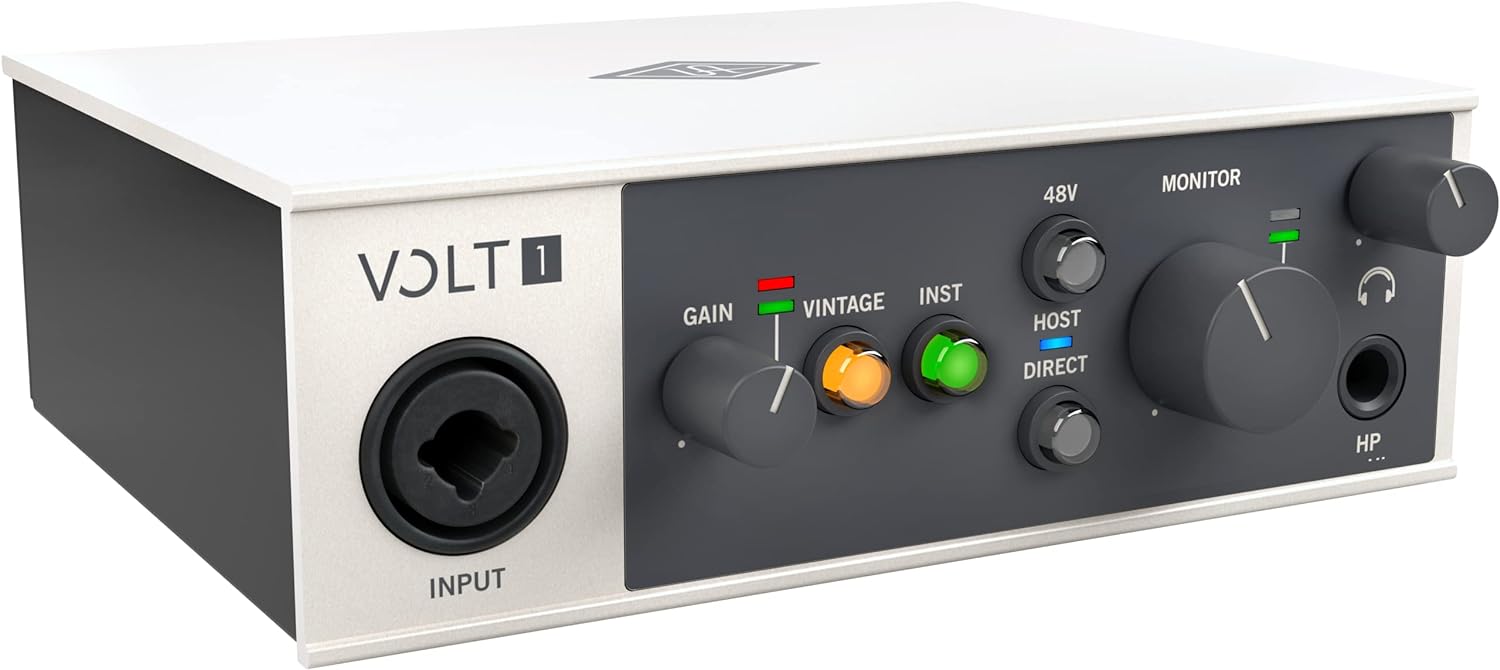
The Universal Audio Volt 1 is a professional-grade USB audio interface designed specifically for home recording enthusiasts, singers, songwriters, guitarists, livestreamers, and podcasters. At its core, it delivers studio-quality sound in a compact form factor that works across Mac, Windows, iPad, and iPhone, making it an ideal choice for anyone looking to start or upgrade their recording setup without breaking the bank.
What truly sets the Volt 1 apart is its inclusion of Universal Audio's legendary 610 tube preamp emulation in Vintage mode, combined with a suite of professional UAD plugins and the award-winning LUNA Digital Audio Workstation. You get access to industry-standard tools like the LA-2A and 1176 compressors, Pultec EQs, and more, which normally cost hundreds of dollars separately. The interface captures audio at up to 24-bit/192kHz resolution with crystal-clear converters, ensuring every detail and nuance of your performance is preserved.
The build quality is impressive for the price range, featuring a solid metal construction with a sleek grey finish, premium knobs, and a compact footprint measuring just 5.71 inches wide. Users consistently praise its durability, low noise floor on monitoring levels, and minimal latency, making it reliable whether you're tracking vocals, instruments, or streaming live content. The plug-and-play setup means you'll be recording within minutes of unboxing.
The main limitation is its 1-in/2-out configuration, which restricts simultaneous multi-track recording and may feel constraining as your skills advance. Additionally, the vintage preamp can introduce unwanted distortion if you push the input gain too aggressively, and the interface requires both an external power supply and two USB ports, which some users find inconvenient.
The Universal Audio Volt 1 represents exceptional value for beginners and intermediate recordists. Its combination of professional sound quality, included software, and ease of use makes it one of the best audio interfaces in its price range. Whether you're building your first home studio or looking for a portable recording solution, the Volt 1 delivers the sound and reliability you'd expect from Universal Audio's heritage.
Audio Quality: 24-bit/192kHz maximum sample rate with high-quality converters for pristine audio capture.
Connectivity: USB connection with support for Mac, Windows, iPad, and iPhone (iOS 14 and later). Requires external power supply and Lightning to USB adapter for iPhone compatibility.
I/O Configuration: 1 audio input and 2 audio outputs, compatible with microphones, electric guitars, and MIDI devices.
Physical Design: Dimensions of 5.71 inches wide by 5.12 inches deep by 1.97 inches high, weighing 544 grams, with premium metal construction.
Included Software: LUNA Digital Audio Workstation, UAD plugins including LA-2A, 1176, Pultec EQs, PolyMAX Synth, Century Tube Channel Strip, and Oxide Tape Recorder.
Warranty: 1-year manufacturer warranty included.
Ideal For: The Volt 1 is perfect for singers, songwriters, guitarists, podcasters, and livestreamers who want professional recording quality without the complexity or cost of larger interfaces. It's an excellent choice for beginners building their first home studio, as well as established musicians looking for a portable, secondary recording solution.
Best Use Cases: Home vocal and guitar recording, podcast production, live streaming with Discord or similar platforms, songwriting and demo creation, and mobile recording on iPad or iPhone. The included software suite makes it particularly valuable for users who want to learn mixing and production without purchasing additional plugins.
Not Ideal For: Musicians who need multiple simultaneous inputs for full band recording or complex multi-track setups should consider larger interfaces with more I/O options. Those with strict USB port limitations on their computer may find the dual USB requirement inconvenient.

Pros
- Exceptional value for budget-conscious beginners and experienced musicians on tight budgets
- Midas preamp technology ensures professional-grade sound quality that punches above its price class
- Straightforward setup requires minimal technical knowledge, making it ideal for first-time users
- Durable metal casing and proven track record provide confidence in long-term reliability
- Direct monitor switch and headphone output enable comfortable tracking without latency issues
Cons
- Monitor output quality is noticeably lower than higher-end interfaces, limiting mixing accuracy
- Signal and clipping indicator lights only activate above 50% gain, potentially missing some input issues
- Limited to 48 kHz base sample rate, though it can handle up to 96 kHz with some DAWs
The Behringer UMC22 is a compact 2x2 USB audio interface designed for solo musicians, podcasters, home recordists, and anyone entering the world of digital audio production. This interface brings professional recording capabilities to your laptop or desktop computer without the complexity or expense of high-end gear. It is specifically built for creators who prioritize simplicity, affordability, and reliable performance over flashy features.
The standout feature is undoubtedly the Midas-designed mic preamp, which carries decades of professional audio heritage into this budget-friendly package. Users consistently report that the preamp delivers surprisingly clean, detailed recordings of vocals and acoustic instruments. The combination XLR/TRS input jack accommodates both microphones and line-level gear, while the dedicated 1/4 inch instrument input lets you connect guitars or keyboards without needing external adapters. Direct monitoring capability allows you to hear yourself in real-time during recording, dramatically improving performance quality and reducing latency frustration.
Build quality is solid with an all-metal chassis that feels more durable than competitors at this price point. The interface requires no external power supply thanks to USB bus power, and driver installation is straightforward on both Windows and Mac systems. Setup takes minutes rather than hours, and the device integrates seamlessly with Pro Tools, Ableton Live, Cubase, and virtually every other major DAW on the market. The compact size makes it genuinely portable for mobile recording sessions or travel.
The main limitations are that the monitor output quality is noticeably compromised compared to higher-tier interfaces, and the signal indicator lights require above 50% gain to function properly. The base sample rate tops out at 48 kHz, though some configurations support up to 96 kHz. These tradeoffs are reasonable given the price point and intended use case.
The UMC22 remains an excellent first interface or backup solution for anyone serious about recording but unwilling to spend hundreds of dollars. After a decade on the market with thousands of satisfied users, it has proven its reliability and value proposition repeatedly. For under fifty dollars, you get professional-grade preamp technology, plug-and-play simplicity, and genuine recording capability that will not disappoint beginners or budget-conscious professionals alike.
Audio Connectivity: 2 inputs via combination XLR/TRS jack plus 1/4 inch instrument input, 2 outputs via 1/4 inch TRS jacks, USB 2.0 connection
Audio Quality: 48 kHz sample rate standard, up to 96 kHz maximum, 24-bit resolution, Midas-designed mic preamp with phantom power support
Physical Specs: Ultra-compact all-metal housing, USB bus powered, no external power supply required, weight approximately 16 ounces
Compatibility: Windows and Mac computers, compatible with Pro Tools, Ableton Live, Cubase, and all major DAW software
Features: Direct monitor select switch, headphone output with dedicated volume control, signal and clip indicator LEDs, +48V phantom power switch
Who Should Buy: This interface is perfect for beginners making their first recording setup investment, podcasters needing reliable voice capture, home musicians recording guitar or vocals, and experienced engineers seeking an affordable backup interface. It excels for solo artists working in small spaces or mobile recording situations.
Who Should Look Elsewhere: If you need professional mixing and mastering capabilities with pristine monitor output, or if you require more than two simultaneous inputs, consider stepping up to a higher-tier interface. Producers working at 192 kHz or requiring FireWire connectivity should also explore alternatives.
Setup Tips: Install drivers before connecting the device. Use quality balanced XLR cables for microphone connections to minimize noise. Position the interface on a stable surface away from magnetic interference. Adjust input gain so the signal peaks around 75% to avoid clipping while maintaining headroom.
Best Use Cases: Home recording studios, podcasting setups, guitar and vocal recording, bedroom producer setups, educational environments, and as a portable backup interface for traveling musicians.

Pros
- Clean, quiet preamp with excellent dynamic range produces professional-quality recordings without noise or hiss
- Exceptional build quality with rugged construction that rivals interfaces costing significantly more
- Compact and portable design makes it perfect for mobile recording, podcasting, and travel
- Straightforward driver installation and seamless compatibility across Windows, Mac, and Linux systems
- Outstanding value for the feature set, including MIDI I/O, balanced outputs, and zero-latency monitoring
Cons
- Limited to 2 input channels, so simultaneous multi-track recording requires external mixing solutions
- Dynamic microphones may require external preamp to avoid driving gain too high during recording
The Mackie Onyx Artist 1x2 is a compact USB audio interface designed for singer-songwriters, content creators, and home studio producers who need professional recording quality without the bulk or complexity of larger systems. This bus-powered interface delivers everything needed for high-fidelity home recording in a portable package.
The standout feature is the boutique-quality Onyx microphone preamp, which delivers clean, quiet recordings with class-leading dynamic range and minimal noise. The dedicated 1/4" input with Hi-Z switch makes connecting guitars and bass straightforward, while 48V phantom power support enables use with studio-grade condenser microphones. Real-world performance is excellent, with users reporting flawless recording stability on Windows 11 and Mac systems, plus seamless integration with popular DAW software including Pro Tools.
Build quality is exceptional for the price. The rugged construction feels comparable to interfaces costing two to three times as much, with clearly labeled knobs and illuminated buttons that make operation intuitive. The compact dimensions (6.4" x 4.4" x 1.9") and lightweight design make it genuinely portable, while zero-latency direct monitoring ensures you hear yourself without delay during recording sessions.
The main limitation is the 2-input channel count, which restricts simultaneous multi-track recording. Users with dynamic microphones may also need an external preamp to avoid maxing out the gain. However, these constraints are typical for interfaces at this price point and rarely impact home studio workflows.
The Mackie Onyx Artist 1x2 delivers professional sound quality, robust construction, and practical features at an exceptional price. It's an excellent choice for anyone starting a home studio or upgrading from basic USB microphones, offering genuine Mackie engineering in a format that actually works for real-world recording situations.
Recording Specifications
Resolution: 24-bit/192kHz high-resolution audio
Channels: 2 in / 2 out
Frequency Response: 20Hz to 192kHz
Inputs and Outputs
Microphone Input: XLR with 48V phantom power
Instrument Input: 1/4" TRS with Hi-Z switch
Headphone Output: 1/4" stereo
Line Outputs: Left/Right balanced
MIDI I/O: Included
Connectivity and Power
Interface: USB 2.0
Power: Bus-powered via USB (no adapter required)
Latency: Zero-latency direct monitoring
Compatibility: Windows 10+, Mac OS, Linux
Physical Specifications
Dimensions: 6.4" D x 4.4" W x 1.9" H
Weight: 1.2 pounds
Warranty: 1-year all-inclusive
Included Software
Pro Tools First
The Musician Collection (23 plugins and instruments)
Quick Start Guide
Perfect For
Singer-songwriters recording vocals and acoustic instruments at home
Podcasters and content creators needing professional audio input
Home studio producers starting their first setup
Musicians upgrading from basic USB microphones
Anyone needing portable, professional recording capability
Consider Alternatives If
You need more than 2 simultaneous input channels for multi-track recording
You require extensive analog I/O for complex studio setups
You need bus-powered operation with high-impedance loads
Why This Interface Wins
The Onyx Artist 1x2 combines professional preamp quality with genuine portability and exceptional value. Most competitors at this price sacrifice either sound quality or build durability. Mackie delivers both, making this interface an easy recommendation for anyone serious about home recording.
Pros
- Exceptional value at this price point with dual XLR inputs that competitors charge significantly more for
- Compact 7.5-inch width and lightweight design make it genuinely portable for on-the-go recording
- Zero-latency monitoring via USB/Direct switch eliminates the frustration of hearing delayed playback while recording new parts
- Included software suite jumpstarts your production immediately without additional purchases
- Transparent preamps deliver clean, professional-grade audio from entry-level to mid-range microphones
Cons
- Plastic construction feels lightweight, which some users perceive as lower build quality despite reliable performance
- 48kHz maximum sample rate is lower than some competing interfaces, limiting high-resolution audio work
- Gain staging may require careful management with certain microphones, as some users report insufficient gain at maximum levels
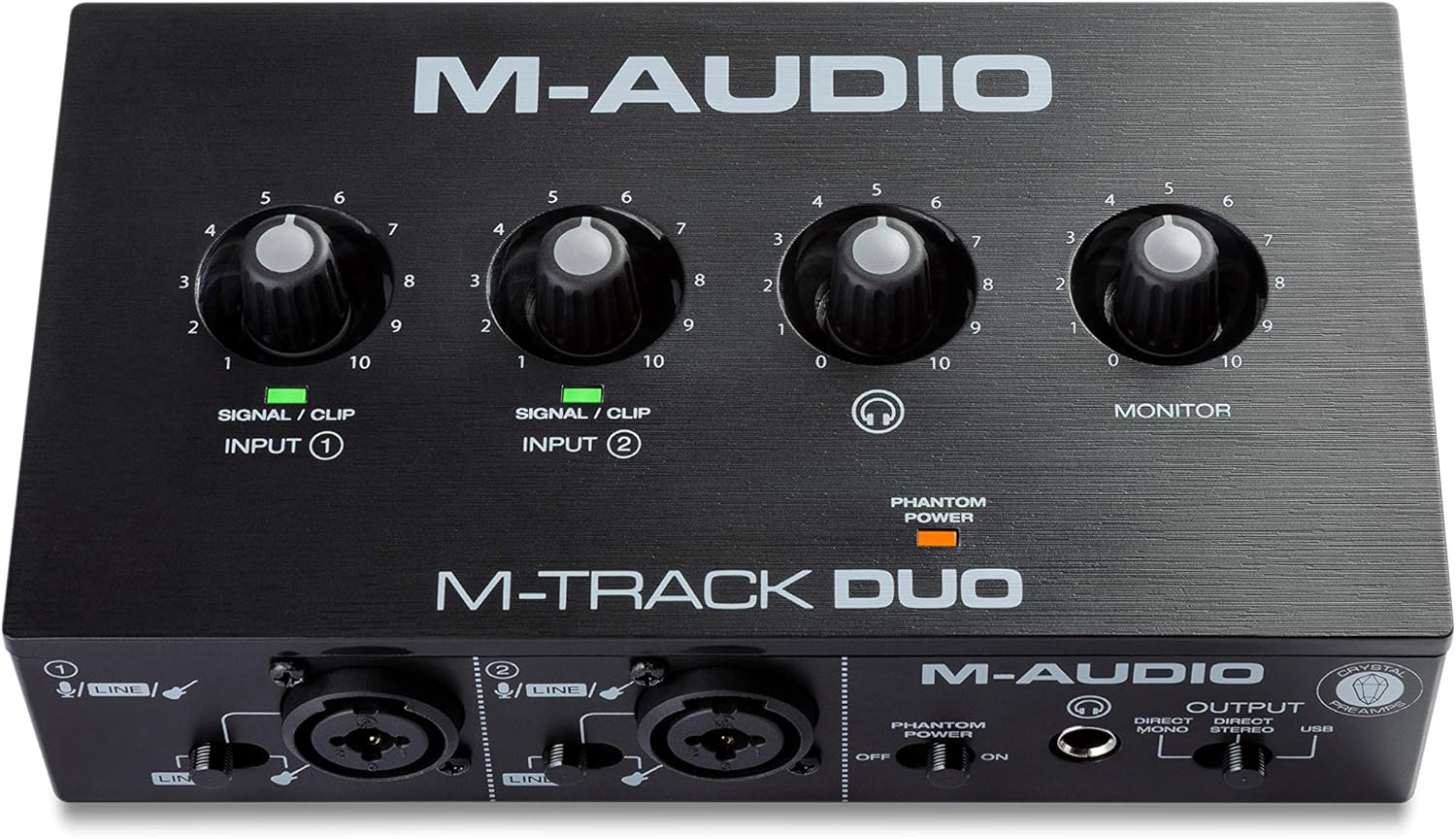
The M-Track Duo is a compact USB audio interface designed for podcasters, musicians, and content creators who need professional recording capabilities without the complexity or cost of larger studio setups. With dual XLR combo inputs, phantom power, and integrated instrument switching, this interface handles vocals, acoustic instruments, guitars, keyboards, and line-level devices with equal competence. It's the kind of gear that lets you go from idea to finished recording in minutes rather than hours.
What sets the M-Track Duo apart is its zero-latency direct monitoring feature, which eliminates the maddening delay that plagues cheaper interfaces. The USB/Direct switch lets you blend your live input signal with playback from your DAW, making it easy to record layered parts or add instruments to existing compositions. The transparent Crystal Preamps deliver clean, detailed audio that punches above its weight class, and phantom power support means you can work with professional condenser microphones without compromise.
Build quality is straightforward plastic construction that feels lightweight but proves durable in real-world use. The compact 7.5-inch width and 0.3kg weight make it genuinely portable, fitting easily into a laptop bag. All connections are professional-grade balanced XLR and quarter-inch TRS connectors, with a headphone output that supports standard stereo headphones via a quarter-inch adapter.
The main limitation is the 48kHz maximum sample rate, which is lower than some competing interfaces in higher price brackets. Additionally, some users report that gain staging requires careful management depending on your microphone, though this is rarely a dealbreaker for entry-level recording. The included MPC Beats software and ProTools First bundle provide legitimate production tools, though you'll likely graduate to more advanced DAWs as your skills develop.
The M-Track Duo delivers genuine value and reliability for anyone starting their recording journey or needing a portable backup interface. It handles its core mission of capturing clean, professional audio without fuss, making it an excellent choice for podcasters, singer-songwriters, and bedroom producers with realistic budgets.
Audio Specifications: Maximum sample rate of 48kHz with 16-bit resolution, 20kHz frequency response, and 1 megaohm impedance. Two channels of audio input and output.
Connectivity: Dual balanced XLR microphone inputs with phantom power, balanced quarter-inch line inputs, unbalanced quarter-inch instrument inputs, stereo quarter-inch main outputs, quarter-inch TRS headphone output, and USB Type B connection for computer and compatible iOS devices.
Dimensions and Weight: 7.5 inches wide by 4.34 inches deep by 2.13 inches tall, weighing just 0.3kg for maximum portability. Completely USB-powered with no external power supply required.
Compatibility: Works with Windows 7 and later via ASIO drivers, Mac OS High Sierra through Big Sur with class-compliant support, iOS with Apple Lightning to USB3 adapter, and Android devices. Compatible with all major DAWs including Logic Pro, ProTools, GarageBand, Studio One, Cubase, and Ableton Live.
Included Accessories: USB Type B to Type A cable, software download cards for MPC Beats and ProTools First, user guide, and safety documentation. Backed by a one-year manufacturer warranty.
Ideal For: This interface is perfect for podcasters launching their first show, musicians recording demos at home, content creators adding professional audio to videos, and anyone needing portable recording capability. It's also excellent for experienced engineers who need a reliable backup interface or travel-friendly setup.
Consider Alternatives If: You require sample rates above 48kHz for professional mastering work, need more than two simultaneous inputs, or demand premium metal construction and extensive onboard controls. However, for the vast majority of recording scenarios, the M-Track Duo delivers everything you need.
Budget Consideration: At this price point, the M-Track Duo offers exceptional value compared to single-channel competitors and provides genuine professional features like phantom power and zero-latency monitoring that many similarly-priced interfaces omit entirely.

Pros
- Exceptional audio quality with no background noise, even at budget price point
- Truly plug-and-play functionality works immediately on Windows, Mac, and Linux systems
- Dual combo jacks provide maximum flexibility for microphones, guitars, and line-level sources
- Lightweight and compact form factor ideal for desk space and portability
- Zero-latency monitoring enables confident tracking without hearing delay or echo
Cons
- LED illumination on gain knobs does not function as prominently displayed in product images
- Requires careful gain adjustment when connecting instruments with built-in preamps to avoid clipping
- Limited to 2 input channels, which may not suit users needing more simultaneous inputs
The PIYONE Q2 is a 2x2 USB-C audio interface designed for home recordists, podcasters, guitarists, and content creators who want professional-grade sound without complexity. It bridges the gap between budget-friendly and professional-quality recording, making it an ideal first interface for beginners or a secondary interface for established creators.
The standout feature is its genuine plug-and-play operation. Simply connect the USB-C cable to your computer, and the interface is recognized immediately on Windows, Mac, and Linux systems without any driver installation. The 24-bit/192kHz audio resolution captures professional-quality recordings with excellent clarity and minimal noise. The zero-latency direct monitoring feature eliminates tracking delays, allowing you to hear yourself in real-time without the frustrating latency that plagues cheaper interfaces. Dual XLR/TRS combo inputs with 48V phantom power provide flexibility for condenser microphones, dynamic mics, guitars, and line-level sources.
Build quality and design are impressive for the price. The compact form factor fits easily on any desk without consuming valuable space. The illuminated control knobs create a modern, professional aesthetic that looks great in any studio setup. The interface feels solid and well-constructed, with ergonomic knobs and buttons positioned for comfortable operation during long recording sessions.
One notable drawback is that the LED illumination on the gain knobs does not function as prominently as shown in product images, which may disappoint users specifically drawn to this visual feature. Additionally, users must exercise caution when adjusting gain levels with instruments that have built-in preamps, as excessive gain can cause clipping. The 2-channel limitation means this interface cannot handle multiple simultaneous inputs beyond two sources.
Verdict: The PIYONE Q2 delivers exceptional value for beginners and budget-conscious creators seeking professional audio quality without complexity. Its combination of studio-grade sound, zero-latency monitoring, and truly plug-and-play setup makes it an excellent choice for home recording, podcasting, and content creation. Recommended for anyone starting their recording journey or needing a reliable portable interface.
Audio Quality: 24-bit resolution, 192kHz maximum sample rate, high-performance converters, low-noise design
Connectivity: USB-C port (handles both data transfer and bus power), 3.5mm headphone jack
Inputs: 2 XLR/TRS combo jacks, 48V phantom power supply
Channels: 2 input channels, 2 output channels
Features: Zero-latency direct monitoring, monitor mix function, loopback capability, illuminated control knobs, class-compliant design
Compatibility: Mac, Windows PC, Linux, iOS (via USB-C adapter)
Physical: Compact portable design, 0.74 kg weight, Alloy Red finish
Warranty: 2-year limited warranty
Ideal For: Beginner recording artists, podcasters, singer-songwriters, content creators, home studio enthusiasts, and anyone seeking professional audio quality without complex setup requirements.
Perfect Use Cases: Recording vocals with condenser microphones, capturing acoustic guitar performances, podcasting and voice-over work, streaming with professional audio quality, music production on a budget, portable recording for travel or mobile content creation.
Not Ideal For: Users requiring more than 2 simultaneous inputs, professional studios with extensive I/O requirements, or those specifically seeking prominent LED illumination effects on control knobs.

Pros
- Genuinely portable design fits in your pocket and includes convenient back clip for hands-free use
- Excellent audio quality at 24-bit/48kHz with low-latency processing ensures synchronized video recordings
- Works across multiple platforms and devices including iOS, Android, Windows, Mac, and Linux
- Simple one-button operation with no learning curve for beginners and musicians
- Comprehensive compatibility with popular music apps like AmpliTube, Rocksmith+, Yousician, and Tone Bridge
Cons
- Limited app compatibility means some recording software may not work, requiring use of built-in device recorders as fallback
- Mono signal input from most guitars means headphone output will be mono, not stereo
- Not compatible with MacBook Air running Monterey and certain guitar effects software according to manufacturer
The KYXAIN MOMIX CAB is a minimalist portable guitar audio interface designed for musicians and content creators who need to capture high-quality guitar audio on their smartphones or laptops. This pocket-sized device bridges your electric guitar or bass directly to your mobile device or computer, making it perfect for songwriting sessions, live streaming performances, online lessons, karaoke recording, and podcast production. At just 20.5 grams with a convenient clip design, it's genuinely portable enough to carry in your pocket or gig bag.
The standout feature is its 24-bit/48kHz audio quality combined with low-latency digital processing that ensures your recorded audio stays perfectly synced with video. Unlike full-featured audio interfaces, the MOMIX CAB embraces simplicity by handling only recording and monitoring without mixing or effects, making it ideal for beginners who want professional results without complexity. The device connects via Type-C for Android devices and laptops, includes a Lightning adapter for iPhones and iPads, and features a standard 1/4" guitar input jack plus 3.5mm headphone monitoring output.
Build quality is solid for the price point, with a compact form factor and intuitive controls. The volume adjustment buttons and color-coded indicator lights (green for normal, red for peak distortion) make it easy to manage recording levels during live sessions. Plug-and-play operation requires no batteries or software installation, making setup nearly instantaneous. The included Type-C cable, smartphone adapter, and user manual round out the package nicely.
The main limitation is app compatibility, as the MOMIX CAB works as a simple audio interface rather than a full sound card, meaning some recording applications may not recognize it. The manufacturer recommends using your device's built-in recorder if third-party apps don't support it, which is a reasonable workaround. Additionally, most guitars produce mono signals, so you'll get mono output through your headphones rather than stereo monitoring. MacBook Air users on Monterey should be aware of reported compatibility issues.
Overall, the KYXAIN MOMIX CAB delivers excellent value for budget-conscious musicians and streamers who prioritize portability and ease of use over advanced features. If you need straightforward, high-quality guitar recording for your phone or laptop without technical complications, this interface punches well above its price point. It's particularly recommended for beginners, casual musicians, content creators, and anyone seeking a travel-friendly solution for capturing guitar audio on the move.
The MOMIX CAB works with most modern smartphones and computers, but compatibility varies by device and software. For iPhones and iPads, you'll use the included Lightning to Type-C adapter. Android users connect directly via Type-C USB. Windows, Mac, and Linux computers all support the device via USB connection, though MacBook Air users running Monterey may experience issues.
Recording app compatibility includes confirmed support for AmpliTube, Rocksmith+, Yousician, Tone Bridge, Piascore, and Gibson Guitar App. However, not all recording applications recognize the MOMIX CAB, so the manufacturer recommends using your device's built-in voice recorder or audio recorder app as a reliable fallback option. Always test compatibility with your preferred app before purchasing if you have specific software requirements.
Audio Quality: 24-bit resolution, 48 kHz maximum sample rate, monaural recording capability
Connectivity: Type-C USB (Android/Laptop), Lightning (iPhone/iPad), 1/4" guitar input jack, 3.5mm headphone output
Channels: 2-channel configuration
Operating Systems: iOS, Android, Windows, macOS, Linux
Physical: Weight 20.5g, pocket-sized with back clip design
Power: Bus-powered via USB, no batteries required
Warranty: One year manufacturer warranty
Package Contents: MOMIX CAB interface, Type-C male-to-male cable, smartphone port converter, user manual

Pros
- Exceptional value for the price with professional-grade specs and build quality comparable to premium brands
- True plug-and-play functionality makes it accessible for beginners while offering advanced features for professionals
- 48V phantom power support eliminates the need for separate power supplies when using condenser microphones
- Low-latency drivers enable real-time monitoring during recording sessions without audio delay
- Compact, portable design works seamlessly across multiple devices including computers, tablets, and smartphones
Cons
- USB-C power input has reported reliability issues in some units, though USB connectivity remains functional
- Occasional static output reported by users, typically resolved by power cycling the device
- Maximum sample rate specification shows 48 kHz in some documentation despite 192kHz capability claims, creating potential confusion
The Kmise USB Audio Interface is a compact, all-in-one recording solution designed for guitarists, vocalists, podcasters, and content creators who demand professional sound quality without the professional price tag. This device integrates microphone input, instrument input, headphone output, and speaker output into a single unit, eliminating cable clutter and simplifying your recording setup.
The standout feature is its 24-bit/192kHz recording resolution combined with built-in 48V phantom power, allowing you to connect professional condenser microphones directly without additional equipment or power supplies. The ultra-low latency drivers enable real-time monitoring during recording, which is essential for vocal tracking, guitar overdubs, and podcast production where immediate feedback matters. Users consistently praise the sturdy metal construction and responsive knobs that feel professional despite the affordable price point.
Setup is genuinely effortless: connect via USB 3.0 to any Mac, PC, or compatible mobile device and start recording immediately without installing complex drivers. The compact 6.5-inch width fits easily into any home studio or portable recording rig, making it equally suitable for bedroom producers and traveling musicians.
Some users have reported occasional static output or USB-C power input issues in rare cases, though these appear to be isolated hardware defects rather than design flaws. Power cycling typically resolves static issues. The device performs reliably for everyday recording tasks, and multiple reviewers have noted the build quality rivals well-known premium brands at a fraction of the cost.
For anyone starting a home studio, upgrading from onboard computer audio, or seeking a portable recording interface, the Kmise USB Audio Interface delivers exceptional value. It successfully bridges the gap between beginner-friendly operation and professional-grade sound quality, making it an intelligent choice for podcasters, musicians, and voice actors on a budget.
Audio Resolution: 24-bit/192kHz recording resolution
Phantom Power: 48V phantom power with single-press activation switch
Connectivity: USB 3.0 Type-A connection
Channels: 2 channels
Inputs: Microphone input, instrument/line input
Outputs: Headphone output, speaker output
Latency: Ultra-low latency professional drivers
Compatibility: Mac, PC, iOS, Android, guitar, laptop, smartphone, tablet
Dimensions: 6.5 inches W x 3.5 inches D x 1.5 inches H
Weight: 1.5 pounds
Warranty: 6-month manufacturer warranty
Model: MI8423-KUS
Podcasters: The all-in-one design with multiple inputs and low-latency monitoring makes podcast recording and editing straightforward without external equipment.
Home Studio Musicians: Guitarists and vocalists benefit from the 24-bit/192kHz resolution, phantom power support, and real-time monitoring for tracking and overdubbing.
Content Creators: Streamers and voice actors appreciate the compact size, plug-and-play setup, and professional condenser microphone compatibility for broadcast-quality audio.
Budget-Conscious Beginners: The accessible price point and simple operation make this ideal for anyone starting their first home recording setup without overwhelming complexity.
Traveling Musicians: The portable form factor and multi-device compatibility work perfectly for musicians who record on the go or between multiple locations.

Pros
- Exceptional value for money, delivering professional audio specs at under $30
- Intuitive controls and zero-latency monitoring make it accessible for beginners and professionals alike
- Versatile connectivity supports everything from condenser mics to guitars with independent gain adjustment
- Compact and portable design ideal for home studios, mobile recording, and on-location work
- No driver installation required, works immediately across multiple operating systems and devices
Cons
- Quality control issues reported by some users, including missing buttons on certain units
- May require additional power solutions for certain Android devices lacking full OTG compliance
- Limited to 2x2 channel configuration, not suitable for multi-track recording setups
The Jolgoo 2x2 USB audio interface is a compact recording solution designed for musicians, podcasters, content creators, and home studio enthusiasts who demand professional audio quality without breaking the bank. This budget-friendly interface packs studio-grade specifications into a portable form factor, making it an accessible entry point for anyone serious about audio recording.
The standout feature is undoubtedly the zero-latency direct monitoring capability, which allows performers to hear themselves in real-time without distracting delay. Combined with 24-bit/192kHz audio conversion, users consistently report capturing crystal-clear vocals, acoustic instruments, and podcast audio with impressive clarity. The 48V phantom power support means you can connect professional condenser microphones, elevating your recording quality significantly. Independent gain controls and LED peak indicators help prevent clipping, giving you precise control over input levels.
Build quality is solid with a sturdy metal housing designed to shield against interference. The interface includes dedicated headphone monitoring, stereo line outputs for studio monitors, and both USB-C and USB-A cable options. Its compact size makes it equally at home on a desktop or packed into a mobile recording rig. Setup is genuinely plug-and-play across Windows, macOS, iOS, and Android devices, with full compatibility for major DAWs like Pro Tools, Ableton, and GarageBand.
Some users have reported quality control concerns, including missing buttons on certain units, which is disappointing at any price point. Additionally, some Android devices may require a power bank due to OTG compliance variations. The 2x2 channel configuration also limits it to stereo recording, which is fine for most solo recording scenarios but won't support multi-track setups.
The Jolgoo 2x2 delivers impressive value for budget-conscious recordists. It successfully bridges the gap between toy interfaces and expensive professional gear, making professional-quality recording accessible to everyone. Recommended for beginners exploring audio production, podcasters seeking portable solutions, and musicians wanting reliable recording without premium pricing.
Audio Specifications: 24-bit resolution, 192kHz maximum sample rate, 2x2 channel configuration, XLR/line combo inputs with independent gain control, 48V phantom power support, zero-latency direct monitoring.
Connectivity: USB connection, includes both USB-C and USB-A cables, compatible with Windows, macOS, iOS, and Android devices. Headphone monitoring output and stereo line outputs for studio monitors.
Compatibility: Works with Avid Pro Tools, Ableton Live, Steinberg Cubase, GarageBand, Audacity, and other mainstream DAWs. Driver-free operation for immediate plug-and-play setup.
Physical: Rugged metal construction for durability and interference shielding, weighs 0.81 kg, compact design suitable for desktop and mobile recording. Includes 12-month manufacturer warranty.
Best For: Home studio recording, podcasting, voiceover work, singer-songwriter demos, and anyone transitioning from smartphone recording to dedicated audio equipment. Excellent for beginners learning audio production fundamentals.
Consider This If: You need professional audio quality on a tight budget, require portable recording capabilities, or want to upgrade from built-in computer audio. The phantom power support makes it particularly valuable if you plan to invest in quality microphones.
Not Ideal For: Professional multi-track recording sessions requiring more than 2 channels, or users requiring extensive technical support. Quality control issues suggest checking your unit carefully upon arrival.
Power Considerations: USB-powered design eliminates need for external power supplies. Note that some Android devices may not provide sufficient power via OTG, in which case a powered USB hub or power bank solves the issue.
How to Choose Your First Audio Interface
Inputs and Connectivity
First, consider what you need to plug in. A single XLR/TRS combo input is sufficient for a solo podcaster with one microphone. If you plan to record a vocal and an acoustic guitar simultaneously, or host a two-person podcast, you will need at least two inputs. Also, verify the connection type to your computer; USB-C is common for modern laptops, while some models use older USB-A or include adapters.
Beyond microphone inputs, look for a dedicated Hi-Z instrument input if you record guitar or bass directly. This high-impedance input is designed to properly handle the signal from pickups. Most interfaces in our audio interfaces category offer this feature, making them versatile tools for musicians.
Sound Quality and Phantom Power
The core job of an interface is to deliver clean, accurate sound. Key specifications include preamp quality, bit depth, and sample rate. For entry-level work, 24-bit/48kHz resolution is a solid standard that captures excellent detail. Some models offer up to 192kHz for extra headroom. The built-in preamps should provide enough clean gain for your microphone without introducing hiss or noise.
If you use a condenser microphone, 48V phantom power is non-negotiable. This feature sends power to the mic through the XLR cable. Always ensure the interface has a dedicated switch for this function. It is a standard feature on most home studio interfaces, including many featured in our roundup of the best black audio interfaces.
Monitoring and Latency
<!–Latency is the slight delay between singing into a mic and hearing it through your headphones. It can be distracting and disrupt your performance. A direct monitor function is the solution. This feature routes the input signal directly to the headphone output, bypassing the computer for zero-latency monitoring. Look for a simple switch or knob that blends the direct sound with your computer’s playback.
Also, check the headphone output power. A robust output can drive higher-impedance headphones adequately. A dedicated volume knob for monitoring is a valuable convenience, allowing you to adjust your headphone level independently from the main output levels to your speakers. This is a key aspect of a comfortable workflow in any recording and musical instruments setup.
Software and Compatibility
<!–Your interface should work seamlessly with your computer and software. Most modern interfaces are class-compliant, meaning they work with macOS, iOS, and Windows without installing special drivers. This plug-and-play capability is perfect for beginners. Always confirm compatibility with your specific operating system before purchasing.
Many bundles include valuable software, like a lightweight Digital Audio Workstation (DAW) or plugin suites. These can provide everything you need to record, edit, and mix your first projects. While a USB microphone offers simplicity, an interface paired with a standard XLR mic, like those in our USB microphones guide, offers far greater flexibility and sound quality potential as you grow.
Final Thoughts
Choosing your first audio interface is an exciting step toward professional-quality creations. For the solo creator seeking legendary preamp quality and superb bundled software, the Focusrite Scarlett Solo 3rd Gen USB-C Audio remains a benchmark. If your priority is maximum value and two-input flexibility on a tight budget, the Behringer UMC22 Audiophile 2×2 delivers reliable performance that has supported countless first recordings. Whichever model you select, you are investing in the essential bridge that turns your creative ideas into captured audio.
Frequently Asked Questions
Do I need an audio interface if I have a USB microphone?
A USB microphone has a basic interface built into it, which is convenient for starters. However, a dedicated external interface provides higher-quality preamps, more input options, and direct monitoring. It also allows you to upgrade your microphone separately in the future, offering a more flexible and professional long-term setup for podcasting or music.
What is the most important feature for a beginner audio interface?
Reliable, clean preamps and a direct monitor function are the two most critical features. Clean preamps ensure your recordings are free of unwanted noise and hiss. The direct monitor switch eliminates distracting latency so you can hear yourself in real-time while recording, which is essential for delivering a natural vocal or instrumental performance.
Can I use an audio interface with my phone or tablet?
Yes, many modern interfaces are compatible with iOS and Android devices, provided you have the correct adapter (like a Lightning to USB or USB-C cable). This is excellent for mobile recording, live streaming, or creating content on the go. Always check the product specifications for confirmed mobile compatibility before you buy.
How many inputs do I need for podcasting?
<!–For a solo podcast, one XLR input is enough. For a podcast with two hosts or an interviewer and guest, you will need an interface with at least two XLR inputs to connect two microphones independently. This allows you to record each voice on a separate track, giving you much greater control during editing to adjust levels and apply processing.


Write Your Review
No reviews yet. Be the first to share your experience!