

Your Xbox Series X delivers stunning visuals, but are you missing half the experience? The console’s advanced audio capabilities, like Dolby Atmos and DTS:X, demand a speaker system that can keep up. The built-in TV speakers often leave dialogue muffled and action scenes flat. This guide is for gamers who want to hear every footstep, explosion, and whispered command with crystal clarity.
We have reviewed nine top-performing soundbars to find the perfect audio upgrade for your Xbox Series X. Whether you prioritize cinematic immersion, competitive edge, or simple setup, you will find a model here to transform your gaming sessions. For a broader look at gaming audio, see our guide on the best soundbars for PS5.
| Pick | Product | BRD Score | Where to buy |
|---|---|---|---|
| Top Pick 25% OFF |
 Razer Leviathan V2 X PC Gaming Soundbar with RGB |
9.9/10 | View on Amazon.com |
| 24% OFF |
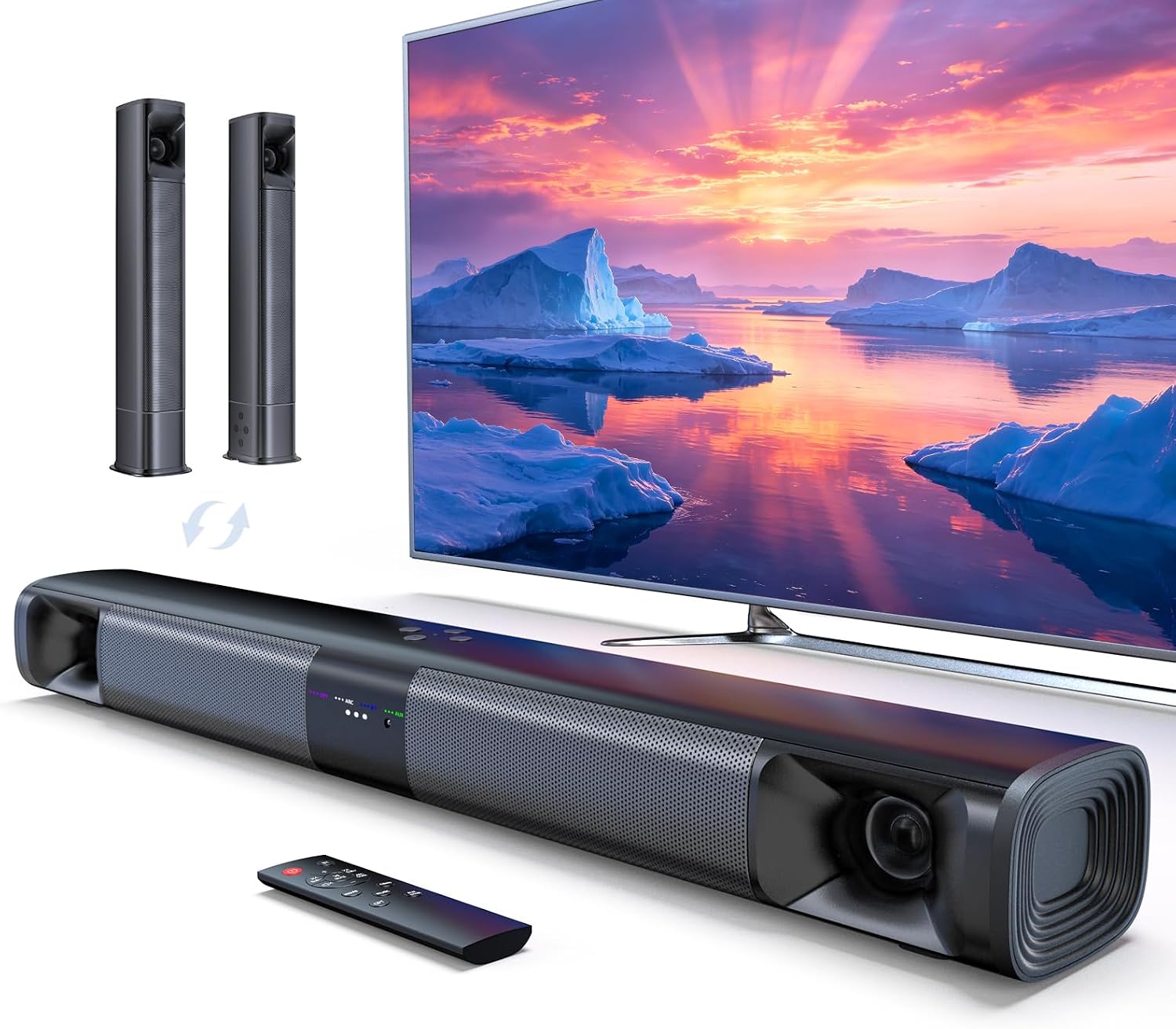
 Assistrust KY-8000 80W Detachable Soundbar |
9.6/10 | View on Amazon.com |
Prices and discounts as of Nov 23, 2026 and may have changed. Check Amazon for the current price.
Pros
- Exceptional value for money with audio quality comparable to premium brands like Bose
- Truly plug-and-play setup with single USB-C connection eliminates cable management headaches
- Crisp, clear audio with strong bass response enhances gaming and movie experiences
- Dual connectivity options via USB and Bluetooth provide maximum flexibility
- Sleek RGB lighting and compact design complement modern gaming setups perfectly
Cons
- No bass subwoofer included, so bass response relies entirely on built-in drivers and radiators
- Audio output can split between multiple devices, requiring manual toggling in some scenarios
- Limited to 10-meter Bluetooth range, so not ideal for larger rooms or distance streaming
The Razer Leviathan V2 X is a compact PC gaming soundbar engineered for desktop users and gamers who demand immersive audio without sacrificing workspace. It's purpose-built for streamlined setups where a single USB-C cable serves dual duty, powering the device and delivering crystal-clear audio to your monitor or gaming rig. This soundbar is perfect for anyone upgrading from tinny monitor speakers or downsizing from bulky multi-speaker systems.
Performance-wise, the Leviathan V2 X punches above its weight class. Its dual full-range drivers and passive radiators produce rich stereo sound with impressive clarity and bass response that rivals much pricier competitors. Gaming audio feels immersive with crisp details and dynamic range, while movies and music benefit from the 90dB output capability. Bluetooth 5.0 connectivity ensures lag-free audio when paired with mobile devices, and the seamless switching between PC and phone via the Razer Audio App adds genuine convenience to daily use.
Build quality reflects Razer's gaming heritage with a sleek black finish and a compact form factor that tucks neatly beneath most monitors. The 14-zone Chroma RGB lighting system syncs with your gaming peripherals through Razer Synapse, creating cohesive visual effects that enhance immersion without overwhelming your setup. The minimalist design prioritizes function over flash, keeping your desk clean and professional-looking.
The main limitation is the absence of a dedicated subwoofer, which means bass enthusiasts may find the low-frequency response somewhat constrained compared to larger 2.1 systems. Additionally, audio output occasionally splits between connected devices, requiring manual toggling through the app in certain scenarios. The 10-meter Bluetooth range is standard but worth noting if you plan to use it from across a larger room.
Verdict: The Razer Leviathan V2 X delivers exceptional audio quality and convenience for PC gamers and desktop users on a budget. Its single-cable setup, impressive sound stage, and RGB customization make it a worthy upgrade from monitor speakers. Recommended for anyone seeking a compact, clutter-free soundbar that doesn't compromise on performance.
Audio Output: Stereo, 90dB maximum volume
Drivers: 2x full-range drivers, 2x passive radiators
Connectivity: USB Type-C (wired), Bluetooth 5.0 (wireless)
Bluetooth Range: 10 meters
Frequency Response: 20 KHz
Audio Channels: 2.0 stereo
RGB Lighting: 14 customizable zones with Razer Chroma ecosystem support
Control: Razer Audio App and Razer Synapse software
Dimensions: Compact bar mount design fits beneath standard monitors
Power: USB Type-C single cable
Warranty: 1 year manufacturer limited warranty
Included: USB Type-C cable and product documentation
Who Should Buy: PC gamers with limited desk space, content creators needing monitor-mounted audio, and users upgrading from basic monitor speakers. Also ideal for anyone seeking a second soundbar for a secondary gaming or work setup.
Who Should Skip: Audiophiles requiring deep bass response should consider pairing this with a separate subwoofer or opt for larger 2.1 systems. Users with rooms larger than 10 meters who rely solely on Bluetooth connectivity may want to verify compatibility with their setup first.
Setup Considerations: Requires a USB-C port on your PC or motherboard. Older systems may need a USB-C adapter (sold separately). Optimal placement is directly beneath your monitor for balanced stereo imaging. Allow the device a full charge cycle before expecting maximum responsiveness from the power button.
Customization Tips: Download Razer Synapse to unlock full RGB lighting potential and sync with compatible gaming peripherals. Use the Razer Audio App to toggle between USB and Bluetooth inputs and customize audio profiles for different content types like gaming versus music streaming.
Pros
- Extremely easy setup with most users reporting connection in under 5 minutes, including ARC TV remote compatibility
- 2-in-1 detachable form factor offers rare placement flexibility not found in most soundbars at this price
- Comprehensive connectivity with all required cables included in the box for ARC, Optical, and AUX hookups
- Auto Volume Boost feature effectively solves the common problem of fluctuating TV audio levels
- Strong value proposition with 80W output and multiple EQ modes at a sub-$50 price point
Cons
- Remote control does not include AAA batteries, which is an inconvenient omission that requires an extra purchase before first use
- ARC connection may require volume levels above 80% on some TV brands such as TCL Roku to achieve satisfactory loudness
- No wall-mount template is included in the box, making precise screw placement for wall installation more difficult
The Assistrust KY-8000 is a compact 80W soundbar designed for budget-conscious buyers who want a meaningful audio upgrade for their TV, PC, gaming setup, or projector. Priced well under $100, it targets everyday home theater users, renters, and students who need solid sound without a complex or expensive installation.
The standout feature here is the 2-in-1 detachable design, which allows the single 17-inch bar to split into two independent vertical tower speakers. This gives users a level of placement flexibility that is genuinely rare at this price tier. Combined with four high-performance dynamic drivers and 80W of output power, the soundbar produces noticeably fuller and more detailed audio than typical built-in TV speakers, with the Auto Volume Boost feature doing a commendable job of keeping dialogue audible without sudden loud spikes.
Build quality is respectable for the price, using a mix of recycled ABS plastic and metal components. The low-profile black finish looks clean and modern beneath most TVs, and at just under 3kg it is light enough to wall mount or reposition easily. The included remote provides straightforward control, and Bluetooth 5.0 ensures a stable wireless pairing experience across phones, tablets, and laptops.
There are a few genuine drawbacks worth noting. The remote ships without batteries, which is an unnecessary inconvenience. Some users on specific TV brands have reported that the ARC connection requires higher-than-expected volume levels to sound balanced. Additionally, no wall-mount template is provided, which complicates screw placement for those who want a clean wall installation.
Overall, the Assistrust KY-8000 is a compelling pick for anyone seeking an affordable, flexible, and easy-to-use soundbar upgrade. It punches above its weight in features and sound quality, and the comprehensive warranty and support package add meaningful peace of mind. Minor packaging omissions aside, this is one of the better budget soundbars available today.
Model: Assistrust KY-8000 | Speaker Output: 80W | Audio Channels: 2.0 Stereo | Drivers: 4 Dynamic Drivers | Frequency Response: up to 20 kHz
Connectivity: Bluetooth 5.0, HDMI ARC, Optical (Toslink), 3.5mm AUX | Power Source: AC Adapter (100V input) | Control: Included Remote Control
Dimensions: 17 inches (L) x 3.5 inches (W) x 2.5 inches (H) | Weight: 2.97 kg | Color: Black | Enclosure: 60% Recycled ABS, 25% Metal, 15% Other
Mounting Options: Tabletop, Horizontal, Vertical, Wall Mount | Compatible Devices: Smart TV, PC, Laptop, Smartphone, Tablet, Projector, Home Theater | EQ Modes: Movie, Music, News
In the Box: 1x Detachable Soundbar, 1x Power Adapter, ARC Cable, Optical Cable, 3.5mm AUX Cable, 1x Remote (batteries not included), 2x Bases | Warranty: 18-Month Limited plus 60-Day Replacement Policy
If you are shopping for a soundbar under $50, the most important factors to consider are connectivity options, ease of setup, and whether the form factor fits your space. The Assistrust KY-8000 excels in all three areas, making it a strong default choice for most casual buyers in this price range.
For TV users, the HDMI ARC connection is the most convenient option as it allows your existing TV remote to control the soundbar volume. Before purchasing, confirm that your TV has an ARC-labeled HDMI port. If not, the included Optical or AUX cables provide reliable wired alternatives. Bluetooth 5.0 is ideal for wireless use with phones or tablets, or for moving the speaker to a different room temporarily.
The 2-in-1 detachable feature is a genuine differentiator. If you have a wide TV setup or a gaming room where you want stereo separation, splitting the bar into two vertical towers can meaningfully improve the sense of audio width and immersion. This makes the KY-8000 a smarter buy than a similarly priced traditional single-bar unit.
Consider this soundbar if you need: an affordable first soundbar upgrade, a secondary room audio solution, a soundbar for a dorm or small apartment, or a gaming audio boost for a PC or console setup. It is less ideal for dedicated audiophiles or home theater enthusiasts who prioritize deep bass, as there is no subwoofer included or subwoofer output port.
Remember to pick up a pack of AAA batteries before your soundbar arrives, as they are not included with the remote. Also note that wall mounting will require you to measure and mark screw positions manually since no mounting template is provided in the box.
Buying Guide: Choosing Your Xbox Series X Soundbar
Audio Formats: Dolby Atmos & DTS:X
Your Xbox Series X supports object-based audio formats like Dolby Atmos and DTS:X. These create a three-dimensional soundscape where effects move around you. A soundbar with these certifications, like the LG S70TY or OXS Thunder Pro, fully utilizes your console’s audio output. This is crucial for pinpointing enemy locations in competitive shooters.
Virtual surround sound technologies, such as DTS Virtual:X, simulate this effect without extra speakers. The Amazon Fire TV Soundbar and VIZIO V-Series use this to great effect. For a deeper dive into this technology, explore our review of the best soundbars with DTS.
Connectivity and Low Latency
A seamless connection is vital for gaming. Audio lag can ruin immersion and competitive play. Prioritize soundbars with HDMI eARC ports, like the TCL S45H, for a single-cable connection that supports high-quality audio formats. Bluetooth 5.0 or higher, found on the Razer Leviathan V2 X, offers stable wireless streaming for music between matches.
Sound Profile and Customization
Gaming requires a different sound profile than movies or music. Look for models with dedicated gaming modes or EQ presets. The OXS Thunder Pro offers specific modes for FPS, racing, and MOBA games. The Samsung B-Series features an Adaptive Sound mode that optimizes audio in real-time. These features ensure dialogue is clear and environmental cues are distinct.
Bass is another key consideration. A separate wireless subwoofer, included with the Samsung B-Series, delivers the deep rumble of explosions. Built-in woofers, like those in the OXS Thunder Pro, provide a powerful punch without extra hardware. Your room size and personal preference will guide this choice. You can find more options on our main soundbars category page.
Form Factor and Setup
Consider your gaming space. A compact soundbar like the VIZIO V-Series fits neatly under a monitor or in a modest entertainment center. For a desktop-focused setup, the Razer Leviathan V2 X is designed to sit perfectly beneath your screen. If you want a showpiece, the MEREDO model adds RGB lighting that syncs with your game audio for extra flair.
Final Thoughts
Upgrading your Xbox Series X audio is a game-changer. For a premium, immersive experience that leverages every audio channel, the OXS Thunder Pro Gaming Soundbar is a top-tier choice with its dedicated gaming modes. If you seek excellent value and reliable performance with a wireless subwoofer, the Samsung B-Series Soundbar HW-B550F delivers balanced, room-filling sound perfect for both gaming and movies.
Frequently Asked Questions
Do I need a soundbar with Dolby Atmos for my Xbox Series X?
While not strictly necessary, a Dolby Atmos-certified soundbar unlocks the full potential of your console’s audio. It provides a significant advantage in games that support the format by creating precise overhead and surround sound effects, greatly enhancing immersion.
What is the most important connection for a gaming soundbar?
An HDMI eARC (Enhanced Audio Return Channel) port is the most important. It carries the highest quality audio formats from your Xbox to the soundbar with minimal latency. This single-cable solution is superior to optical or standard ARC connections for a modern gaming setup.
Can I use a PC gaming soundbar with my Xbox Series X?
Yes, absolutely. Many soundbars designed for PCs, like the Razer Leviathan V2 X, work perfectly with consoles via their AUX or optical inputs. However, ensure the model supports the audio formats your Xbox games use for the best experience. Some may lack HDMI connectivity.
How do I reduce audio lag when gaming with a soundbar?
First, use a direct HDMI connection, preferably via eARC. Second, check your TV’s settings for a “Game Mode” which often reduces audio processing delay. Finally, some soundbars, like those from Samsung and LG, have auto-sync technology that aligns audio with your video signal.




Write Your Review
No reviews yet. Be the first to share your experience!