

Desk real estate is precious. Between your monitor, keyboard, and that cup of coffee, there’s little room left for bulky speakers. Yet, the tinny audio from your monitor or laptop can ruin an immersive gaming session, make dialogue in movies hard to follow, and leave your music feeling flat. The solution is elegantly simple: an under-monitor soundbar. Designed to sit flush beneath your screen, these compact bars deliver a significant audio upgrade while maintaining a clean, organized workspace.
This guide is for anyone who wants better sound for their computer without the clutter. We have evaluated eight leading under-monitor soundbars, from budget-friendly USB options to feature-rich models with Bluetooth and customizable lighting. Our goal is to help you cut through the noise and find a speaker that fits your space, your devices, and your listening preferences. For a broader look at compact audio solutions, explore our dedicated soundbars category.
| Pick | Product | BRD Score | Where to buy |
|---|---|---|---|
| Top Pick 21% OFF |
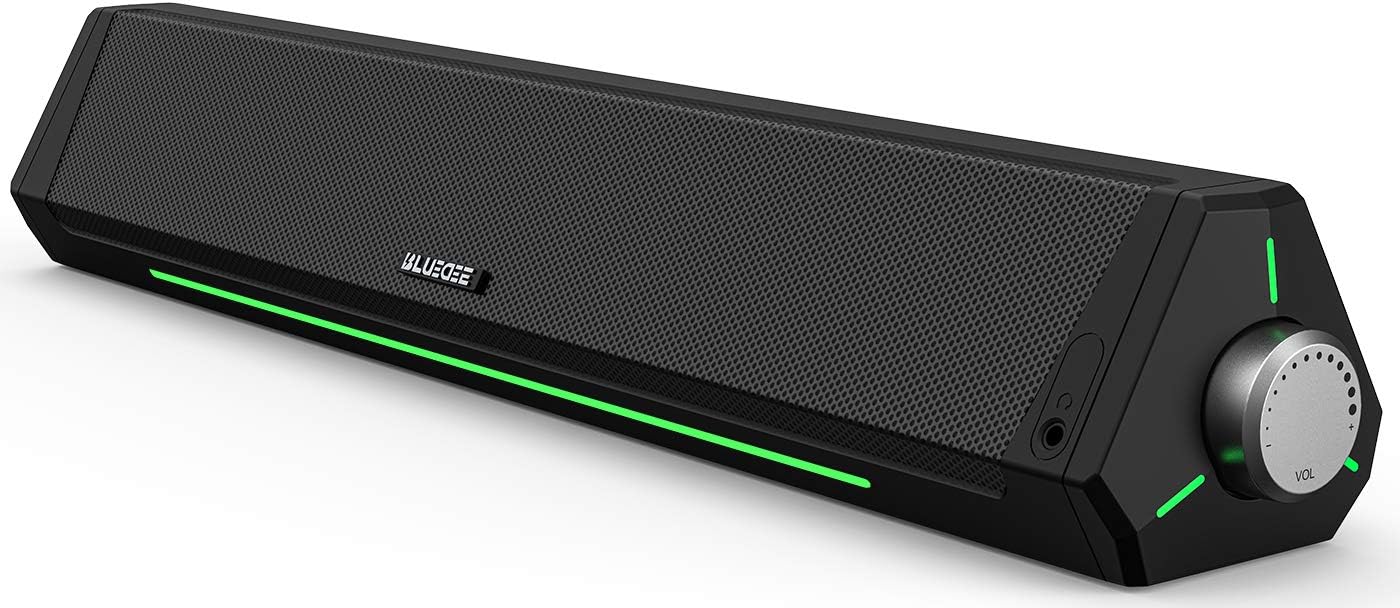 Bluedee Computer Soundbar Speaker with Bluetooth |
9.6/10 | View on Amazon.com |
| 25% OFF |
 Razer Leviathan V2 X PC Gaming Soundbar with RGB |
9.9/10 | View on Amazon.com |
Prices and discounts as of Nov 23, 2026 and may have changed. Check Amazon for the current price.
Pros
- Superior sound quality compared to built-in laptop and monitor speakers, with noticeable bass enhancement
- Perfect fit under standard monitors with minimal desk footprint, ideal for space-conscious setups
- Seamless Bluetooth connectivity with 10-meter range and instant pairing reliability
- Attractive ambient lighting adds professional aesthetic to gaming and work environments
- Simple USB power delivery eliminates cable clutter with tidy nylon-braided Y-cable design
Cons
- No dedicated power button or sleep mode, speaker remains in standby with flashing lights when powered
- USB power dependency means speaker won't function without active USB port connection
- Not water-resistant, so placement near beverages or humid environments not recommended
The Bluedee SK010 is a compact desktop soundbar engineered for professionals, gamers, remote workers, and anyone frustrated with inadequate built-in speaker performance. This 16.4-inch soundbar delivers a noticeable audio upgrade without monopolizing desk space, making it an ideal solution for modern workstations where real estate is premium.
The standout feature is its dual-driver, dual-diaphragm audio architecture that produces well-balanced sound across the frequency spectrum. Users consistently report impressive bass response and clear midrange clarity, particularly beneficial for video conferencing, gaming sessions, and multimedia consumption. The anti-magnetic technology effectively eliminates static interference, resulting in a noticeably crisper listening experience compared to standard computer speakers.
Design and build quality impress with the slim, futuristic profile that slides neatly beneath most monitors. The eco-friendly ABS plastic construction feels durable despite its lightweight 2-pound frame, and the ambient LED light strips add visual sophistication to your setup. The nylon-braided Y-cable consolidates power and audio into a single connection, maintaining workspace organization.
One notable limitation is the absence of a dedicated power button. When your PC remains powered, the speaker enters standby mode with flashing lights, which some users find distracting. Additionally, USB power dependency means you cannot use the speaker without an active USB port, limiting portability compared to battery-powered alternatives.
Overall, the Bluedee SK010 represents excellent value for desktop audio enhancement. Its combination of superior sound quality, compact design, dual connectivity, and eco-conscious construction makes it a compelling choice for anyone seeking professional-grade audio without premium pricing or space requirements.
Audio Performance: Stereo output with dual drivers and dual diaphragms, 10-meter Bluetooth 5.0 range, anti-magnetic technology for interference elimination.
Connectivity: Bluetooth 5.0 wireless and 3.5mm audio jack, USB-powered (compatible with laptops, PCs, power banks, and adapters), 1 built-in microphone for conferencing.
Physical Dimensions: 16.45 inches width x 2.67 inches depth x 2.67 inches height, weighs 2 pounds, tabletop mount design.
Materials and Sustainability: 85% eco-friendly ABS plastic, 5% metal components, eco-friendly cardboard packaging, nylon-braided Y-cable.
Warranty and Support: 18-month manufacturer warranty, lifetime after-sales technical support, includes setup video guide with QR codes.
Remote Workers and Video Conferencing: The built-in microphone and superior audio clarity significantly improve virtual meeting quality, making this ideal for professionals conducting frequent video calls.
Gaming Enthusiasts: Gamers appreciate the enhanced bass response and clear sound staging for immersive gameplay across PC, consoles, and streaming platforms.
Content Creators and Multimedia Users: Video editors, streamers, and content consumers benefit from the dual-driver audio quality and ambient lighting for extended work sessions.
Space-Conscious Users: Anyone with limited desk space who refuses to compromise on audio quality will appreciate the compact 16.4-inch footprint that fits beneath standard monitors.
Budget-Conscious Audiophiles: Those seeking professional-grade sound without premium pricing will find the Bluedee SK010 delivers impressive audio performance at an accessible price point.
Pros
- Exceptional value for money with audio quality comparable to premium brands like Bose
- Truly plug-and-play setup with single USB-C connection eliminates cable management headaches
- Crisp, clear audio with strong bass response enhances gaming and movie experiences
- Dual connectivity options via USB and Bluetooth provide maximum flexibility
- Sleek RGB lighting and compact design complement modern gaming setups perfectly
Cons
- No bass subwoofer included, so bass response relies entirely on built-in drivers and radiators
- Audio output can split between multiple devices, requiring manual toggling in some scenarios
- Limited to 10-meter Bluetooth range, so not ideal for larger rooms or distance streaming
The Razer Leviathan V2 X is a compact PC gaming soundbar engineered for desktop users and gamers who demand immersive audio without sacrificing workspace. It's purpose-built for streamlined setups where a single USB-C cable serves dual duty, powering the device and delivering crystal-clear audio to your monitor or gaming rig. This soundbar is perfect for anyone upgrading from tinny monitor speakers or downsizing from bulky multi-speaker systems.
Performance-wise, the Leviathan V2 X punches above its weight class. Its dual full-range drivers and passive radiators produce rich stereo sound with impressive clarity and bass response that rivals much pricier competitors. Gaming audio feels immersive with crisp details and dynamic range, while movies and music benefit from the 90dB output capability. Bluetooth 5.0 connectivity ensures lag-free audio when paired with mobile devices, and the seamless switching between PC and phone via the Razer Audio App adds genuine convenience to daily use.
Build quality reflects Razer's gaming heritage with a sleek black finish and a compact form factor that tucks neatly beneath most monitors. The 14-zone Chroma RGB lighting system syncs with your gaming peripherals through Razer Synapse, creating cohesive visual effects that enhance immersion without overwhelming your setup. The minimalist design prioritizes function over flash, keeping your desk clean and professional-looking.
The main limitation is the absence of a dedicated subwoofer, which means bass enthusiasts may find the low-frequency response somewhat constrained compared to larger 2.1 systems. Additionally, audio output occasionally splits between connected devices, requiring manual toggling through the app in certain scenarios. The 10-meter Bluetooth range is standard but worth noting if you plan to use it from across a larger room.
Verdict: The Razer Leviathan V2 X delivers exceptional audio quality and convenience for PC gamers and desktop users on a budget. Its single-cable setup, impressive sound stage, and RGB customization make it a worthy upgrade from monitor speakers. Recommended for anyone seeking a compact, clutter-free soundbar that doesn't compromise on performance.
Audio Output: Stereo, 90dB maximum volume
Drivers: 2x full-range drivers, 2x passive radiators
Connectivity: USB Type-C (wired), Bluetooth 5.0 (wireless)
Bluetooth Range: 10 meters
Frequency Response: 20 KHz
Audio Channels: 2.0 stereo
RGB Lighting: 14 customizable zones with Razer Chroma ecosystem support
Control: Razer Audio App and Razer Synapse software
Dimensions: Compact bar mount design fits beneath standard monitors
Power: USB Type-C single cable
Warranty: 1 year manufacturer limited warranty
Included: USB Type-C cable and product documentation
Who Should Buy: PC gamers with limited desk space, content creators needing monitor-mounted audio, and users upgrading from basic monitor speakers. Also ideal for anyone seeking a second soundbar for a secondary gaming or work setup.
Who Should Skip: Audiophiles requiring deep bass response should consider pairing this with a separate subwoofer or opt for larger 2.1 systems. Users with rooms larger than 10 meters who rely solely on Bluetooth connectivity may want to verify compatibility with their setup first.
Setup Considerations: Requires a USB-C port on your PC or motherboard. Older systems may need a USB-C adapter (sold separately). Optimal placement is directly beneath your monitor for balanced stereo imaging. Allow the device a full charge cycle before expecting maximum responsiveness from the power button.
Customization Tips: Download Razer Synapse to unlock full RGB lighting potential and sync with compatible gaming peripherals. Use the Razer Audio App to toggle between USB and Bluetooth inputs and customize audio profiles for different content types like gaming versus music streaming.
How to Choose Your Under-Monitor Soundbar
Connection and Compatibility
Your first consideration should be how the soundbar connects to your devices. The simplest option is a single USB cable that carries both power and audio, offering a true plug-and-play experience. Many models also include a 3.5mm AUX input for broader compatibility with game consoles or older computers.
For maximum flexibility, look for soundbars with Bluetooth 5.0. This allows you to stream wirelessly from your phone or tablet. Some advanced models even offer optical inputs for connecting to a TV. Always confirm the soundbar works with your operating system, whether it’s Windows, macOS, or ChromeOS.
Sound Quality and Power
Do not let the slim profile fool you. A well-designed under-monitor soundbar can produce impressive, room-filling sound. Key factors include the driver configuration and total wattage. Models with dual full-range drivers and passive radiators typically deliver clearer stereo separation and more resonant bass.
Assess whether you prioritize balanced, accurate sound for critical listening or powerful, bass-forward audio for movies and games. For listeners who value clarity in the upper frequencies, our review of the best soundbars with crisp highs offers further insights. Conversely, if deep, impactful bass is your goal, our guide to the best soundbars with punchy bass is a valuable resource.
Design and Mounting
The core appeal of these speakers is their space-saving design. Measure the width beneath your monitor to ensure a good fit. Most soundbars are designed to rest on your desk, but some offer innovative mounting solutions. Clip-on designs attach directly to the bottom bezel of your monitor, while magnetic mounts, like the one on the Dell model, provide a sleek, integrated look.
Consider your cable management needs. A single, braided cable is much tidier than separate power and audio cords. Also, think about aesthetics. Some soundbars feature customizable RGB lighting to match your gaming setup, while others have subtle or no lighting for a professional office environment.
Controls and Extra Features
Convenient controls make daily use a pleasure. A dedicated volume knob or touch-sensitive buttons on the front of the soundbar are ideal. Some multifunction knobs let you switch inputs, control lighting, and play/pause audio with a simple click. For a seamless experience, look for features like automatic channel switching, which ensures correct left/right audio orientation regardless of how you mount the speaker.
Additional features can enhance functionality. A dedicated subwoofer output allows for future audio expansion. An integrated USB charging port can power a peripheral. Smart standby modes reduce power consumption when not in use. Prioritize the features that align with how you will use the soundbar every day.
Final Thoughts
Upgrading your desktop audio with an under-monitor soundbar is one of the most effective ways to enhance your computer experience. By choosing a model that fits your space and connectivity needs, you gain rich, clear sound without sacrificing your clean desk aesthetic. For users seeking a feature-packed, immersive audio experience with vibrant lighting, the Razer Leviathan V2 X is a compelling choice. Alternatively, for a reliable, high-performance soundbar with excellent user reviews and a sleek design, the Nylavee Computer Speakers for Desktop PC represents outstanding value. Whichever you choose, you are investing in a cleaner workspace and far superior sound.
Frequently Asked Questions
Do under-monitor soundbars work with any monitor?
Most under-monitor soundbars are designed to be universal. They simply sit on the desk in front of or beneath your monitor. For clip-on models, check the maximum thickness they can accommodate, usually around one inch. Magnetic mounts are typically proprietary and designed for specific monitor brands, like the Dell soundbar for Dell monitors.
Can I use a USB soundbar with a monitor that doesn’t have USB ports?
Yes, you can. A USB-powered soundbar needs to be connected to a USB port on your computer or laptop for power. The audio signal is also carried through that same USB cable. It does not need to be plugged into the monitor itself. You can also use a wall adapter or a powered USB hub if your computer ports are limited.
Is Bluetooth audio laggy for watching videos or gaming?
Modern Bluetooth 5.0 technology has very low latency, making it suitable for most video content. For competitive gaming where every millisecond counts, a wired USB or AUX connection is still recommended to eliminate any potential audio delay. For general movie watching and casual gaming, Bluetooth 5.0 is generally more than adequate.
How does the sound quality compare to traditional desktop speakers?
A high-quality under-monitor soundbar can rival or exceed the performance of many traditional two-speaker desktop sets. The elongated cabinet allows for better stereo separation and driver placement than tiny satellite speakers. Many models also include dedicated bass diaphragms. For a focused comparison on stereo performance, our guide to the best soundbars for stereo listening provides a detailed analysis. Some models are even capable of high-volume output suitable for filling a room.




Write Your Review
No reviews yet. Be the first to share your experience!