

If you’re building a modern, clean-looking home studio or streaming setup, the color of your gear matters just as much as its performance. A white audio interface offers a sleek, professional aesthetic that stands out from the typical sea of black boxes. Beyond looks, these devices are the critical link between your microphones, instruments, and your computer, responsible for capturing every nuance of your sound.
This guide is crafted for musicians, podcasters, and streamers who want their gear to match their vision. We have evaluated four leading white audio interfaces, assessing their sound quality, features, and overall value. Whether you’re recording vocals, laying down guitar tracks, or broadcasting live, the right interface makes all the difference. For those considering other color schemes, our guide on the best black audio interfaces offers excellent alternatives.
Pros
- Excellent preamp quality produces bright, clear recordings with minimal noise floor
- Air mode adds professional polish to vocal and acoustic recordings without additional equipment
- Compact design perfect for home studios, bedroom producers, and mobile recording setups
- Included software suite eliminates need for expensive DAW purchases
- Highly reliable brand with strong reputation in professional audio industry
Cons
- Single microphone input limits simultaneous multi-instrument recording capabilities
- May require audio driver updates for optimal performance on some Windows systems
- Learning curve for beginners unfamiliar with audio interface operation and gain staging
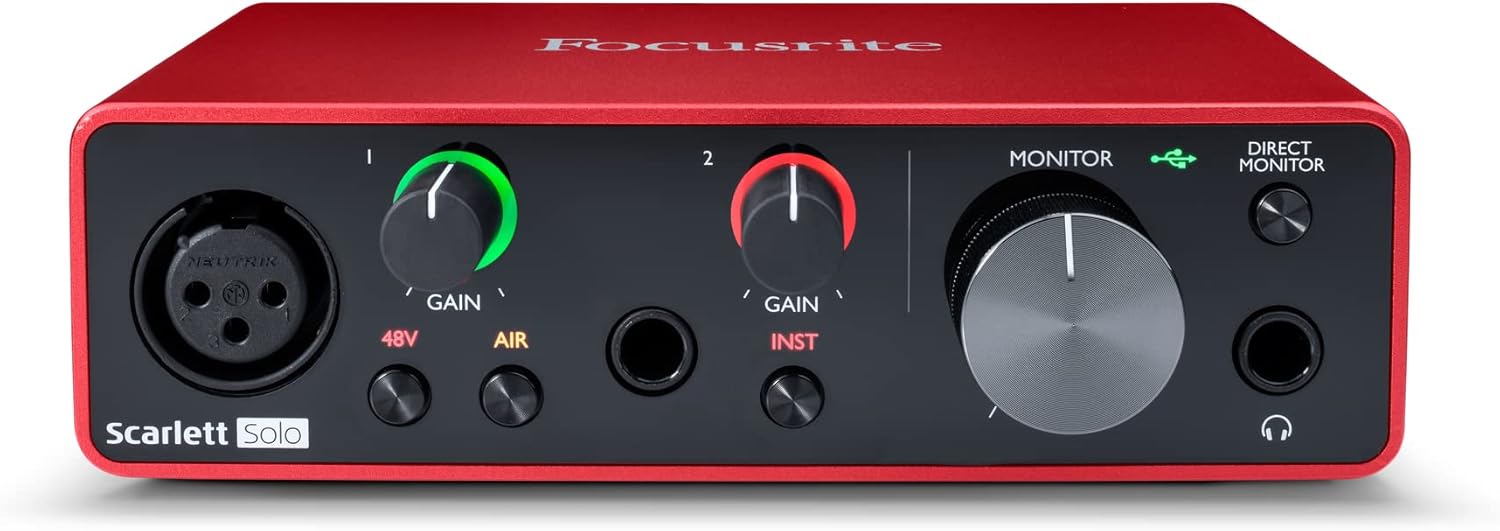
The Focusrite Scarlett Solo 3rd Gen is a professional USB audio interface designed for musicians, podcasters, and content creators who demand studio-quality recordings without the complexity of larger mixing consoles. This compact device bridges the gap between budget-friendly entry-level gear and expensive professional equipment, making it ideal for home studios, bedroom producers, and anyone serious about capturing professional-grade audio.
The standout feature is undoubtedly the high-performance microphone preamp paired with the innovative Air mode, which adds extra clarity and presence to vocals and acoustic instruments. The two high-headroom instrument inputs eliminate clipping and distortion, ensuring your guitar, bass, and other instruments shine through with clarity. Recording at up to 24-bit/192kHz resolution means your productions retain all sonic nuances, while the Gain Halo visual feedback system helps you nail perfect levels every time.
Build quality reflects Focusrite's professional heritage, with a solid metal chassis and intuitive front-panel controls that feel responsive and durable. The USB-C connectivity provides fast, reliable data transfer and modern compatibility with both Mac and Windows systems. The included software bundle (Pro Tools Intro+, Ableton Live Lite, Cubase LE) gives you everything needed to start producing immediately without additional software purchases.
The primary limitation is the single microphone input, which restricts simultaneous multi-track vocal or acoustic recording. Additionally, some Windows users report requiring driver updates for optimal performance. The learning curve for gain staging and audio interface operation may challenge complete beginners, though the included documentation is comprehensive.
The Focusrite Scarlett Solo 3rd Gen represents exceptional value for serious hobbyists and semi-professional creators. Its combination of pristine preamp quality, professional converters, intuitive design, and included software makes it the go-to choice for anyone upgrading from computer microphones or entry-level interfaces. The three-year warranty provides confidence in your investment.
Audio I/O: 1 XLR microphone input, 2 high-impedance instrument inputs, 2 balanced line outputs, headphone output
Audio Quality: 24-bit/192kHz recording and playback resolution with high-performance converters
Connectivity: USB-C to computer, compatible with all major audio recording software
Channels: 2 channels (stereo)
Features: Switchable Air mode, Gain Halo visual feedback, low-noise outputs, headphone monitoring
Software Included: Pro Tools Intro+, Ableton Live Lite, Cubase LE, Hitmaker Expansion
Warranty: 3-year manufacturer warranty worldwide
Compatible Devices: Microphones, instruments, personal computers, headphones, studio monitors
Who Should Buy: Musicians recording at home, podcasters seeking professional audio quality, guitarists and bassists needing quality instrument preamps, content creators upgrading from built-in computer audio, and producers working with limited space.
Who Should Look Elsewhere: Users needing simultaneous multi-microphone recording, those requiring extensive analog mixing features, or professionals running high-channel-count studios requiring more I/O options.
Setup Tips: Ensure your computer meets USB-C requirements and install drivers before first use. Spend time learning gain staging with the Gain Halo visual indicator to avoid clipping. Experiment with Air mode on different sources to understand its impact on your recordings.
Value Comparison: At this price point, the Scarlett Solo 3rd Gen outperforms competitors by offering superior preamp quality, professional software bundle, and proven brand reliability. The included software alone typically costs $200+ if purchased separately.
Pros
- Exceptional value with included professional-grade plugins and DAW software
- Vintage preamp mode delivers warm, analog character that enhances vocal and instrument recordings
- Extremely user-friendly with plug-and-play setup and low learning curve for beginners
- Compact, lightweight design with premium metal construction feels durable and portable
- Excellent cross-platform compatibility including iOS and iPad support
Cons
- Limited to 1 input and 2 outputs, which may feel restrictive for multi-track recording setups
- Requires external power supply and takes up two USB ports when connected to computer
- Vintage preamp mode can introduce distortion if input gain is set too high
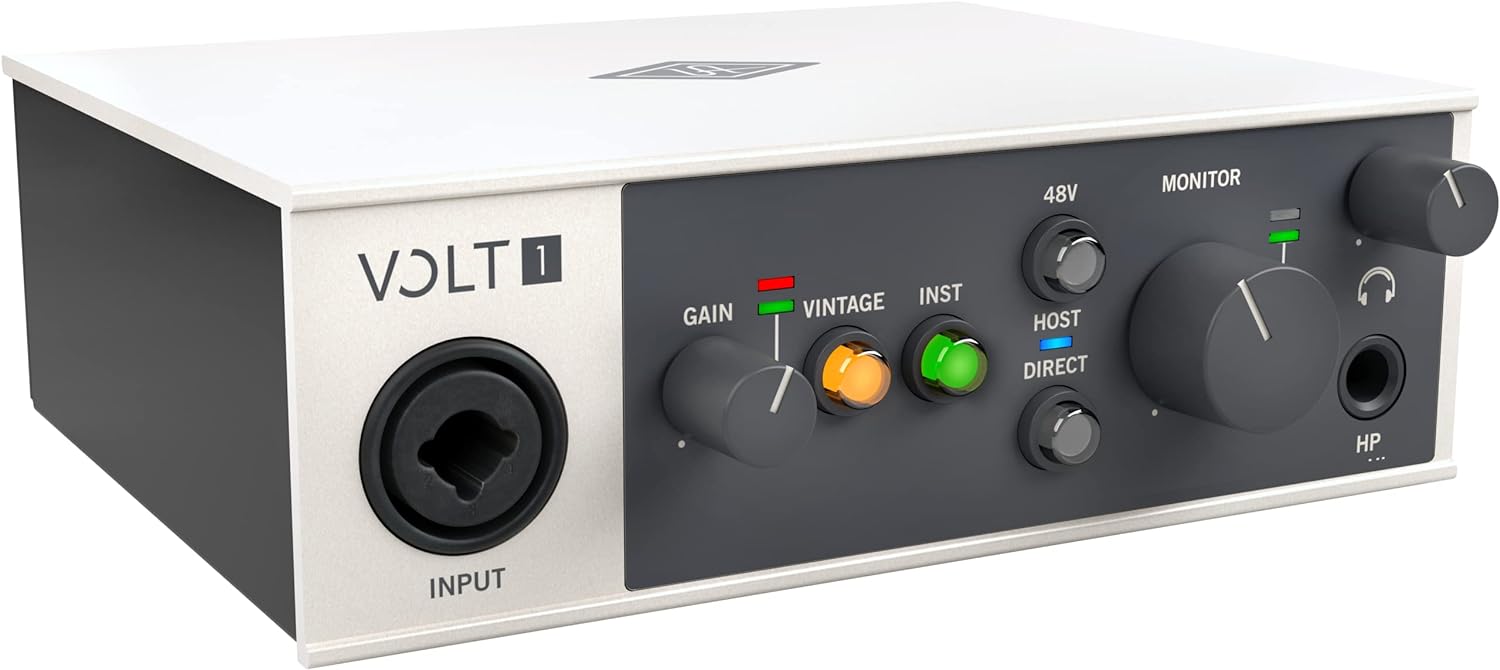
The Universal Audio Volt 1 is a professional-grade USB audio interface designed specifically for home recording enthusiasts, singers, songwriters, guitarists, livestreamers, and podcasters. At its core, it delivers studio-quality sound in a compact form factor that works across Mac, Windows, iPad, and iPhone, making it an ideal choice for anyone looking to start or upgrade their recording setup without breaking the bank.
What truly sets the Volt 1 apart is its inclusion of Universal Audio's legendary 610 tube preamp emulation in Vintage mode, combined with a suite of professional UAD plugins and the award-winning LUNA Digital Audio Workstation. You get access to industry-standard tools like the LA-2A and 1176 compressors, Pultec EQs, and more, which normally cost hundreds of dollars separately. The interface captures audio at up to 24-bit/192kHz resolution with crystal-clear converters, ensuring every detail and nuance of your performance is preserved.
The build quality is impressive for the price range, featuring a solid metal construction with a sleek grey finish, premium knobs, and a compact footprint measuring just 5.71 inches wide. Users consistently praise its durability, low noise floor on monitoring levels, and minimal latency, making it reliable whether you're tracking vocals, instruments, or streaming live content. The plug-and-play setup means you'll be recording within minutes of unboxing.
The main limitation is its 1-in/2-out configuration, which restricts simultaneous multi-track recording and may feel constraining as your skills advance. Additionally, the vintage preamp can introduce unwanted distortion if you push the input gain too aggressively, and the interface requires both an external power supply and two USB ports, which some users find inconvenient.
The Universal Audio Volt 1 represents exceptional value for beginners and intermediate recordists. Its combination of professional sound quality, included software, and ease of use makes it one of the best audio interfaces in its price range. Whether you're building your first home studio or looking for a portable recording solution, the Volt 1 delivers the sound and reliability you'd expect from Universal Audio's heritage.
Audio Quality: 24-bit/192kHz maximum sample rate with high-quality converters for pristine audio capture.
Connectivity: USB connection with support for Mac, Windows, iPad, and iPhone (iOS 14 and later). Requires external power supply and Lightning to USB adapter for iPhone compatibility.
I/O Configuration: 1 audio input and 2 audio outputs, compatible with microphones, electric guitars, and MIDI devices.
Physical Design: Dimensions of 5.71 inches wide by 5.12 inches deep by 1.97 inches high, weighing 544 grams, with premium metal construction.
Included Software: LUNA Digital Audio Workstation, UAD plugins including LA-2A, 1176, Pultec EQs, PolyMAX Synth, Century Tube Channel Strip, and Oxide Tape Recorder.
Warranty: 1-year manufacturer warranty included.
Ideal For: The Volt 1 is perfect for singers, songwriters, guitarists, podcasters, and livestreamers who want professional recording quality without the complexity or cost of larger interfaces. It's an excellent choice for beginners building their first home studio, as well as established musicians looking for a portable, secondary recording solution.
Best Use Cases: Home vocal and guitar recording, podcast production, live streaming with Discord or similar platforms, songwriting and demo creation, and mobile recording on iPad or iPhone. The included software suite makes it particularly valuable for users who want to learn mixing and production without purchasing additional plugins.
Not Ideal For: Musicians who need multiple simultaneous inputs for full band recording or complex multi-track setups should consider larger interfaces with more I/O options. Those with strict USB port limitations on their computer may find the dual USB requirement inconvenient.

Pros
- Exceptional dual-PC functionality eliminates complex hardware routing and software workarounds for multi-PC setups
- Powerful preamp with clean gain structure handles professional XLR microphones without quality loss
- Professional DSP effects sound polished out of the box, reducing need for external processing
- Intuitive BEACN App provides granular control over which audio sources route to specific outputs
- Compact design with premium build quality fits seamlessly into any streaming or workspace setup
Cons
- Requires learning curve with BEACN App and Link App software to fully leverage dual-PC capabilities
- Plastic shell construction may feel less premium compared to all-metal competitors at similar price points
- Best value realized with complex multi-source setups, may be overkill for simple single-mic streaming
The BEACN Studio is a USB-C XLR audio interface designed for content creators who demand professional audio control across multiple devices. It targets streamers, podcasters, remote workers, and gamers running dual-PC setups who need flexible routing, DSP processing, and seamless multi-device audio management without hardware complexity.
What sets this interface apart is its dual USB-C technology and BEACN Link App, which enable unprecedented control over audio routing between two computers simultaneously. The on-board DSP includes professional tools like EQ, compression, expander/gate, and noise suppression that deliver polished audio immediately. Users consistently praise the powerful preamp for handling demanding dynamic microphones, and the 8-channel digital audio capability provides flexibility for complex streaming scenarios with multiple audio sources.
The device itself is surprisingly compact, though slightly larger than expected for its capabilities. The plastic shell matches the BEACN Mix Create aesthetic and feels durable despite being lightweight. The interface pairs exceptionally well with BEACN Mix controllers for hands-on volume and effect adjustments during live streams or recordings.
The main consideration is the learning curve with BEACN's software ecosystem. While the app is intuitive once configured, setting up multi-PC audio routing requires some initial investment of time. Additionally, the plastic construction may not appeal to users seeking all-metal premium aesthetics, though this design choice contributes to the compact footprint.
The BEACN Studio delivers exceptional value for anyone running multi-PC setups or needing professional XLR microphone control with DSP processing. It solves real workflow problems that plague streamers and remote workers, backed by consistently positive user experiences across diverse use cases.
Multi-PC Streamers: The dual USB-C connectivity and BEACN Link App make this the ideal solution for gamers running separate gaming and streaming PCs, or anyone needing to route audio from multiple computers to a single microphone input.
Remote Workers: Share a professional XLR microphone between a personal computer and company-issued work laptop without complex hardware switching or audio cable management. The interface handles real-time DSP processing for both devices simultaneously.
Podcasters and Content Creators: Professional DSP effects, powerful preamp, and multi-channel routing enable sophisticated audio workflows. Control which sounds go to recording tracks, monitor outputs, and audience streams independently.
Not Ideal For: Users seeking a simple USB microphone solution or those with budget constraints who only need basic audio input. This interface targets creators requiring multi-device routing and professional DSP processing.
Connectivity: USB-C, XLR input, supports dual simultaneous USB connections
Audio Channels: 8 channels of digital audio output
DSP Processing: EQ, compression, expander/gate, noise suppression, low-frequency enhancement
Compatible Devices: PC, Mac, gaming consoles, smartphones with USB-C
Preamp: Ultra-low-noise XLR preamp with powerful gain structure
Weight: 6.48 ounces
Software: BEACN App with hearing-based sound tuning, BEACN Link App for cross-PC control, integrates with BEACN Mix and BEACN Mix Create controllers
Compatibility: Works with major streaming software (OBS, Streamlabs, etc.) and DAWs

Pros
- High-resolution 24-bit/192kHz recording capability rivals interfaces costing significantly more
- Dual combo inputs with phantom power provide flexibility for mics, guitars, and line-level sources
- Direct monitoring eliminates latency issues during recording and overdubbing
- Lightweight metal construction makes it ideal for mobile recording and travel
- Seamless compatibility across Windows, macOS, and iOS platforms
Cons
- Limited to 2-in/2-out configuration, which may feel constraining for complex multi-track setups
- Only 8 customer reviews available, providing limited long-term reliability feedback from users
- USB 2.0 connection speed may not be optimal for extremely high-channel-count sessions
The Yamaha UR22MK3 is a professional-grade USB audio interface designed for home studio producers, podcasters, and musicians who demand high-fidelity recording without breaking the bank. This 2-in/2-out interface combines portability with studio-quality specifications, making it an excellent choice for anyone transitioning from built-in soundcards to dedicated audio hardware.
The standout feature of the UR22MK3 is its support for 24-bit/192kHz audio recording, which matches the specifications of interfaces costing significantly more. The dual combo inputs with built-in UR mic preamps and switchable phantom power provide genuine versatility for recording condenser microphones, dynamic mics, guitars, and line-level instruments. The dedicated Hi-Z input further simplifies direct guitar and bass recording without additional adapters, while direct monitoring and loopback functionality eliminate latency issues during recording and overdubbing sessions.
Build quality is solid thanks to the compact, lightweight metal casing that feels professional and durable. The interface is small enough to fit in a backpack for mobile recording yet substantial enough to inspire confidence in its construction. Color options in white and black allow it to match various studio aesthetics, and the intuitive mute buttons and control layout keep operation straightforward.
The main limitation is the fixed 2-in/2-out channel count, which may feel constraining if you plan to expand to complex multi-track recording setups. Additionally, the relatively low number of user reviews suggests limited long-term reliability data, though Yamaha's reputation generally supports the interface's durability.
The Yamaha UR22MK3 delivers excellent value for content creators and musicians seeking professional audio quality in a portable, user-friendly package. Combined with the included Steinberg software suite, this interface provides everything needed to start recording professional-quality audio today.
Audio Specifications: 24-bit/192kHz resolution, USB 2.0 connectivity, 2-in/2-out analog I/O configuration.
Inputs: Two combo inputs (XLR/1/4 inch) with UR mic preamps and phantom power, one Hi-Z input for instruments, mute buttons on all inputs.
Physical: Compact, lightweight metal casing, available in white and black finishes.
Compatibility: Windows, macOS, and iOS devices via USB connectivity.
Software Included: Steinberg software suite for recording, editing, and production workflows.
Who Should Buy: Home studio producers, podcasters, musicians, and content creators needing professional-grade audio recording in a compact, portable format. Ideal for those upgrading from laptop microphones or basic USB mics.
Who Might Want to Look Elsewhere: Users requiring more than 2 simultaneous inputs, those needing extensive MIDI connectivity, or professionals building large-scale multi-track studios may benefit from interfaces with greater channel counts.
Setup Considerations: Ensure your computer has available USB-C ports or use a compatible USB-C hub. The included Steinberg software suite requires installation on your primary recording device. Direct monitoring requires headphones connected to the interface's headphone output.
How to Choose Your White Audio Interface
Input and Output Configuration
Your needs dictate the number of inputs. A solo vocalist or guitarist might thrive with a single-channel interface like the Focusrite Scarlett Solo 3rd Gen USB-C Audio. For recording a stereo synth or using two microphones simultaneously, a two-input model like the Yamaha 2-in/2-out USB-C Audio Interface is essential.
Also, consider outputs for connecting studio monitors. Most interfaces offer at least two balanced outputs. If you plan to upgrade your monitoring setup, explore our recommendations for the best audio interfaces for studio monitors to ensure compatibility.
Sound Quality and Preamps
The microphone preamplifier is the heart of any interface. It boosts your mic’s signal without adding noise or coloration. Models like the Universal Audio Volt 1 USB Audio Interface include a ‘Vintage’ mode, emulating classic analog warmth for vocals and instruments.
Look for interfaces that support high-resolution audio (24-bit/192kHz) for the most detailed recordings. This spec is standard on most modern devices, ensuring your captures retain all their sonic fidelity from the moment you press record.
Software and Onboard Features
Bundled software can provide tremendous value. Many interfaces come with a Digital Audio Workstation (DAW) and plugin suites, helping you start recording immediately. Onboard hardware features are equally important.
Direct monitoring lets you hear your input with zero latency, which is crucial for recording. The BEACN Studio (White) – USB XLR Audio Interface takes this further with built-in DSP for real-time effects like compression and noise suppression, perfect for streamers. For musicians working with keyboards, specialized features can be key, as detailed in our resource for the best audio interfaces for synthesizers.
Connectivity and Workflow
Modern interfaces predominantly use USB-C for fast, reliable connections to computers and even mobile devices. Consider your specific workflow. If you manage a dual-PC streaming setup, the BEACN Studio’s proprietary dual USB technology is a game-changer.
For simpler setups, a standard plug-and-play USB connection is often sufficient. Ensure the interface is compatible with your operating system. You can browse more options in our main audio interfaces category to compare connectivity across different models.
Final Thoughts
Selecting the right white audio interface blends technical needs with personal style. For most musicians and creators starting their journey, the Focusrite Scarlett Solo 3rd Gen USB-C Audio remains a stellar, reliable choice known for its pristine preamps and excellent software bundle. Meanwhile, streamers and content creators seeking advanced, real-time audio control should strongly consider the feature-rich BEACN Studio (White) – USB XLR Audio Interface for its unparalleled onboard DSP and dual-PC functionality. Whichever model you choose, you’re investing in a centerpiece that will look and sound professional for years to come.
Frequently Asked Questions
Why would I choose a white audio interface over a standard black one?
A white interface primarily serves an aesthetic purpose, helping to create a bright, modern, and clean studio or desk environment. There is no difference in audio performance based on color. The choice is purely about matching your personal style and the visual theme of your workspace, much like selecting other gear from categories like USB microphones.
Can I use a white audio interface for live streaming?
Absolutely. Any high-quality audio interface can vastly improve your stream’s audio over a built-in microphone or USB mic. Interfaces like the BEACN Studio are specifically designed with streamers in mind, offering onboard processing to make your voice sound clear and professional without needing extra software during your broadcast.
Do I need special drivers for these interfaces?
Most modern audio interfaces are class-compliant on macOS and iOS, meaning they will work plug-and-play. For Windows and advanced features on any system, you will typically need to install dedicated drivers from the manufacturer’s website. These drivers ensure stable performance, low latency, and access to all the interface’s functions.
What is the main advantage of an interface with onboard DSP?
Onboard Digital Signal Processing (DSP), as seen in the BEACN Studio, applies effects like EQ, compression, and noise suppression directly within the interface’s hardware. This means your computer’s CPU doesn’t have to handle these tasks, freeing up resources for other software. More importantly, it provides zero-latency monitoring with effects, which is essential for performers and streamers who need to hear their processed voice in real time.


Write Your Review
No reviews yet. Be the first to share your experience!